How to Automate Pest Control Business: The Complete Guide to Converting More Leads

Table of Contents
- Why Speed to Lead Matters More Now Than Ever
- The First Response Framework: Text, Then Call, Then Call Again
- Why the Automated Text Comes Before the Phone Call
- The Voicemail Script That Actually Gets Callbacks
- Cold Leads vs. Warm Leads: How Your Approach Changes
- The Follow-Up Sequence That Never Gives Up
- The First Week: Minimum One Text and One Call Per Day
- The Long-Term Nurture Sequence: Never Give Up Until They Say No
- Keep It Legal: Consent, STOP Replies and Text Registration
- Email vs. Text vs. Calls: What Actually Works
- GoHighLevel for Marketing Automation: One Platform Instead of Ten
- Does GoHighLevel Replace Your CRM?
- Snapshots: The Templates That Save You Months of Work
- Setting Up Your Lead Pipeline: The Stages That Matter
- The Pipeline Mistake That Costs You Thousands
- Automation You Can Set and Forget
- Service Communication: The Automation That Retains Customers
- The Review Request Automation That Generates Reviews on Autopilot
- The Balance Between Automation and Human Touch
- Where AI Voice Agents Fit
- The Biggest Mistakes Pest Control Companies Make With Automation
- The Quick Wins You Can Implement This Week
- The Reality Check: This Takes Work Upfront
- Frequently Asked Questions
- Related Articles
If you’re working out how to automate pest control business operations, start with lead response. Text every new lead within 30 seconds, call within 5 minutes and make six calls on day one. Leads who don’t book get 21 touches in the first week, then texts until they book or say stop. Then automate the 15-minute arrival text, the service-complete text and a Google review request to every customer after every service. Run lead follow-up in GoHighLevel and keep routing and billing in your field service software.
I’m Jake Sheldon, the original founder of Pest Control Millionaires. I’ve helped 400+ pest control companies with lead generation, and this system took my Facebook close rate from 10-15% to 40-45%.
Why Speed to Lead Matters More Now Than Ever
Generating leads is the easy part. Facebook ads work, Google Ads work, SEO works. Converting those leads is where most companies fall apart. You miss four calls in a row while you’re on a route, you call once and give up, or you forget the person who needed to talk to their spouse.
Twenty years ago you could call a lead back the next day. Not anymore. I’ve talked to thousands of pest control owners, and the ones who are crushing it all respond in minutes, not hours. If you wait 10 minutes to call a Facebook lead or a paid directory lead, it’s often already gone. Someone else called, answered their questions and booked the appointment. You paid for the lead, and your competitor closed it.
How fast you need to be depends on where the lead came from:
- Cold leads from Facebook, Google and paid directories are comparing three or four companies and filling out multiple forms. Whoever gets to them first usually wins.
- Warm leads like customer referrals already know and trust you. You can take a day to get back to them.
Slow follow-up is expensive. Alex and Justin, the brothers who built Southwest Weed & Pest to $100K months, told Dan they probably left a hundred grand on the table in one year because they couldn’t keep up with the calls. You can’t call every lead within five minutes from under a crawl space. Automation can text them instantly and keep following up while you work. I go deeper on the first ten minutes in my guide on how to increase pest control sales.
The First Response Framework: Text, Then Call, Then Call Again
Here’s the exact sequence I use for every new lead:
- Within 30 seconds: an automated text goes out. “Hi [name], this is [your name] from [company]. We just received your request for [service]. I’m going to give you a call in the next few minutes to get you scheduled and answer any questions. Talk soon! Reply STOP to opt out.”
- Within 5 minutes: the first call. No answer? Hang up and call right back.
- Still no answer: leave a voicemail (script below).
- 3 to 4 hours later: two calls, back to back.
- That evening: two more calls, back to back.
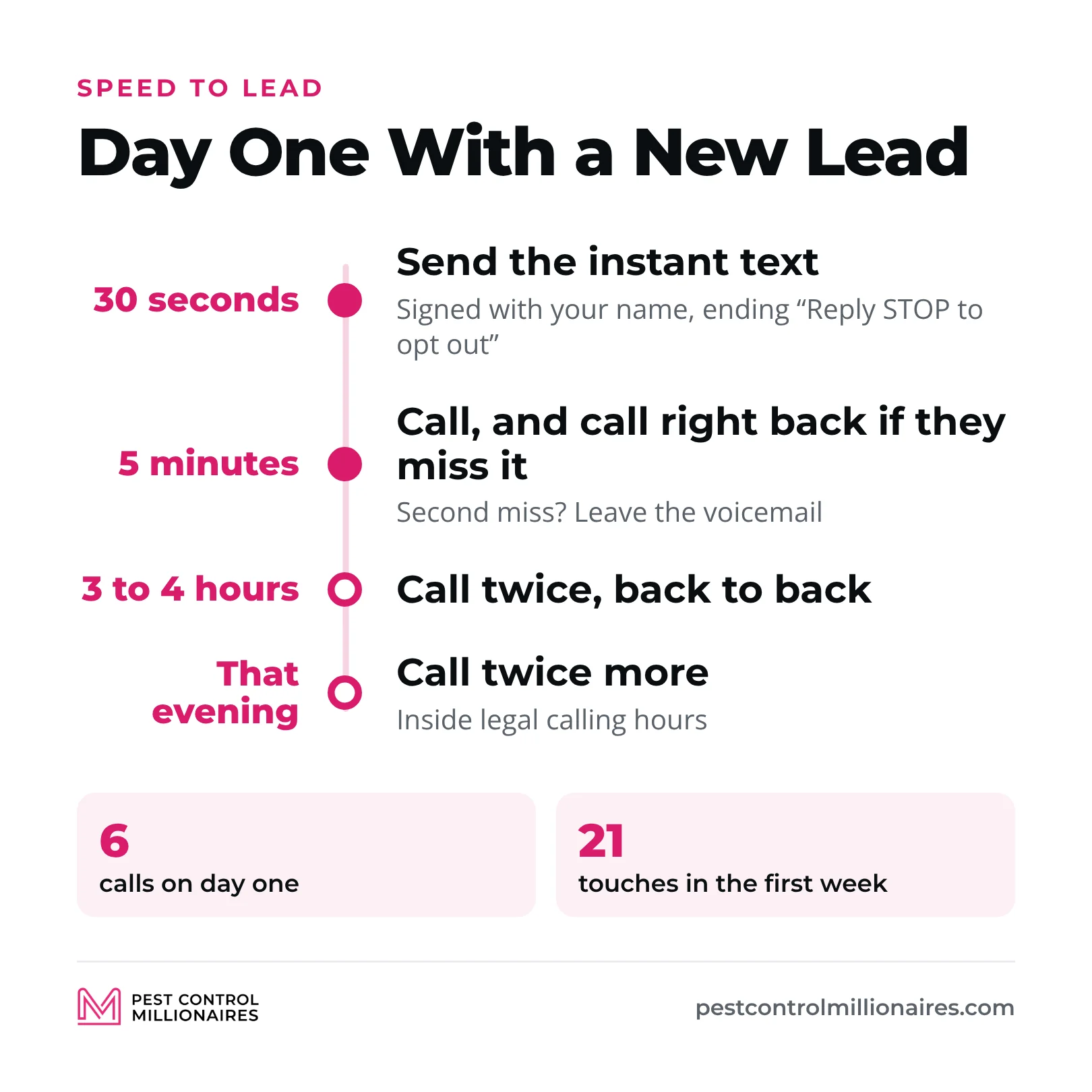
That’s six calls on day one. Sounds insane, right? It works. Same ads, same budget, same leads, and my Facebook close rate went from 10-15% to 40-45%. I went from closing about one lead in seven to nearly one in two.
A note on that number, because it looks like it contradicts my Facebook ads guide, where I say a 20-30% close rate on Facebook leads means you’re crushing it. Both are true. 20-30% is a strong result for a company with decent follow-up. 40-45% is what the full system in this guide gets us: the instant text, six calls on day one and 21 touches in the first week. Before any of it, I was at 10-15%.
Why the Automated Text Comes Before the Phone Call
Most people don’t answer calls from numbers they don’t have saved. Think about your own phone. Unless you’re a business owner expecting customers to call, you probably let unknown numbers ring.
The text fixes that. On iPhones, once you’ve texted and signed it with your name, the phone often shows “Maybe Jake Sheldon” or “Maybe [your company]” when you call a minute later. Now they know who’s calling, and they’re far more likely to pick up.
The back-to-back calls signal urgency. If you really needed to reach your mom, would you call once and give up? No, you’d call until she picked up. I know it feels pushy. When a huge pest control company first told me to do back-to-back calls, I said no way, that’s too aggressive. Then I tried it and my close rate took off. Even Facebook and Google ad reps will call you three times in a row when they’re trying to reach you.
The Voicemail Script That Actually Gets Callbacks
Your voicemail needs three things: who you are, why you’re calling and what you want them to do.
“Hi [name], this is [your name] from [company]. I saw you filled out a form on Facebook for [service]. I’m calling to get you scheduled and answer any questions before you sign up. Give me a call back at this number, or I’ll try you again in a few hours.”
That’s it. Don’t overthink it. Because the text already went out, they have your name and number, and the voicemail confirms that a real company is following up on something they asked for.
Cold Leads vs. Warm Leads: How Your Approach Changes
| Cold leads (Facebook, Google, paid directories) | Warm leads (referrals) | |
|---|---|---|
| How fast | Within minutes | Within a day |
| Follow-up | The full sequence, six calls on day one | Lighter |
| Close over text? | No, get them on the phone | You can, but I still call |
| What they need | More education: your process, trust, answers to objections | A thank-you and the next steps |
I still call everyone, referrals included. We’re a premium service, and I want every customer to feel valued. A personal call lets us thank them and explain our referral program and gift giveaway, which is hard to do over text. Cold leads need the call even more. You have to explain your process, build trust and handle objections, and you can’t do that well over text.
The Follow-Up Sequence That Never Gives Up
Most pest control owners call a lead once, maybe twice, then give up. That’s a massive mistake.
I learned this as a customer. I wanted my teeth whitened, filled out a dentist’s Facebook form for free whitening with a cleaning, and then missed their call because I was in a Zoom meeting. They texted. I forgot to call back. They called and texted every day for five days, and on the fifth day I finally picked up and booked. I told them I knew exactly what it took to get me on the schedule, because I’ve been on their side as a pest control owner. Now I go in every six months. Their persistence earned a recurring customer.
Just because someone doesn’t answer doesn’t mean they don’t want your service. People are in meetings, with their kids, at work. Your job is to keep following up until they book or tell you no. I tell the whole story, and how I once closed a customer after three years, in my guide to the pest control sales funnel.
The First Week: Minimum One Text and One Call Per Day
At minimum, contact every lead at least once a day for five to seven days. We do more. Our first week is 21 touches, and it’s why we close such a high percentage of our leads.
| Day | Touches | What happens |
|---|---|---|
| Day 1 | 7 | Text within 30 seconds, then six calls: two back to back within 5 minutes (voicemail on the second), two 3 to 4 hours later and two that evening |
| Day 2 | 2 | Call in the morning, text in the afternoon |
| Day 3 | 2 | Call and text |
| Day 4 | 2 | Call and text |
| Day 5 | 2 | Call and text |
| Day 6 | 2 | Call and text |
| Day 7 | 2 | Final call and text |
| During the week | 2 | Two emails. Everything else is calls and texts |
| Total | 21 | Leads who still haven’t booked move to the long-term sequence below |
Do people get annoyed? Occasionally. Maybe once every few months someone says, “Stop calling, you’re following up too much.” I’m okay with that. The leads we close because we follow up hard far outweigh the rare person who gets irritated. When someone asks you to stop, stop right away.
The Long-Term Nurture Sequence: Never Give Up Until They Say No
After day seven, leads who haven’t booked go into an automated text sequence:
| When | What goes out |
|---|---|
| Day 14 | Automated text |
| Day 21 | Automated text |
| Day 30 | Automated text |
| Then | A text every two months |
| After that | A text every six months, forever, until they book or reply STOP |
It works because of seasonality. Someone asks for a mosquito quote in May and decides not to do it that year. Next May they get a text: “You were interested in our mosquito control offer last year. This year we’re running the same offer.” Now they’re ready, and they book. Or they went with another company, aren’t happy a year later, get our text and switch.
The percentage is small, but if you’re running a lot of ad spend and generating hundreds or thousands of leads a year, it can add up to another 40 to 50 customers a year. I’ve closed leads after three years of follow-up.
Keep It Legal: Consent, STOP Replies and Text Registration
Following up this hard only works if your texts get delivered and you stay inside the rules. Set these up before you turn on any sequence:
- Get consent on every form. Add a line or checkbox saying the person agrees to calls and texts about their request. Federal law requires prior written consent for automated marketing texts.
- Honor STOP right away. Tell people how to opt out (“Reply STOP to opt out”), and when someone replies stop, quit, end, cancel, unsubscribe or opt out, take them out of every sequence. Federal rules allow no more than 10 business days; set your software to do it instantly.
- Register your texting number. US carriers require A2P 10DLC registration (your business and how you text) for business texts from a regular 10-digit number, and they block unregistered traffic. Your texting platform, GoHighLevel included, walks you through it.
- Check calling hours and limits. Keep calls between 8 AM and 9 PM in the lead’s time zone, the federal window for sales calls. Some states are stricter. Florida allows three sales calls in 24 hours to the same person about the same thing, between 8 AM and 8 PM, so trim day one if you work there.
This isn’t legal advice. Have a lawyer check your forms and sequences, especially if you operate in a state with its own telemarketing law.
Email vs. Text vs. Calls: What Actually Works
Email used to be king. Not anymore. Emails from a company people don’t recognize go to spam or get ignored, while people read every text. That’s why we send only two emails in the first week, and the rest is texts and calls.
Email works better with current customers, because you already have a relationship. Reactivation campaigns, upsell and cross-sell campaigns and referral campaigns can all run on email. For new leads you’re trying to close, stick to texts and calls.
GoHighLevel for Marketing Automation: One Platform Instead of Ten
Before GoHighLevel, I logged into Facebook to check leads, Google to check leads, my website for form fills, then my email and my CRM. It was a mess. GoHighLevel puts every lead from Facebook, Google, Instagram and your website in one place, with every call, text and conversation in one spot. It’s the backbone of most marketing automation for pest control companies that are doing it right.
The second benefit is the automation itself. A lead comes in and the text goes out instantly. Three hours later, an automated call. Four days later, another text. Before GoHighLevel, my team texted every lead by hand, and with hundreds of leads a year that’s a massive time drain.
I cover setup, chatbots and connecting your Facebook and Google pages in my guide to pest control lead management software. Jonas shows how automated texting added well over six figures in a year at his own company in his post on marketing automation for pest control companies.
Does GoHighLevel Replace Your CRM?
No. GoHighLevel is for lead nurturing and tracking, not routing and scheduling. Keep your field service software for that.
| Tool | Use it for | Don’t use it for |
|---|---|---|
| GoHighLevel | Lead capture, follow-up sequences, texting, call recordings, review requests, campaigns | Routing, scheduling, billing |
| Field service software (FieldRoutes, GorillaDesk, Jobber) | Routing, scheduling, invoicing, recurring customers, service notes | Lead nurturing, tracking leads from every source |
When a lead books, move them from GoHighLevel into your field service software for scheduling and service. GoHighLevel is the front end (lead capture and conversion), and your field service software is the back end (service delivery and customer management). Jonas breaks down the full stack Pest Badger runs across its 20 locations in his guide to pest control business software.
Snapshots: The Templates That Save You Months of Work
GoHighLevel has a learning curve. Built from scratch, your sequences can take weeks or months to get right. A snapshot is a template someone else has already built, tested and packaged, so you install it in your account instead of working out all the if-then logic yourself. If you’d rather build it yourself, GoHighLevel’s own YouTube tutorials walk through every step.
We give our snapshots to members of the program: the same sequences I use to close 40-45% of Facebook leads, plus campaigns for current customers. Steve Delaney at Yard Boss texted his customers about the lawn fungus going around and got 200 replies within two or three hours. His team sold $10,000 to $13,000 in fungus treatments that afternoon.
Setting Up Your Lead Pipeline: The Stages That Matter
A lead pipeline shows where every lead is in your sales process. Every company sets theirs up a little differently, but these are the stages you need:
| Stage | Who’s in it | What happens next |
|---|---|---|
| New lead | Just came in | Top priority. Text in 30 seconds, call within 5 minutes |
| Hot lead | Replied and interested | Even higher priority. They’re ready to buy, so call and book them |
| Follow-up 1, 2, 3 | Contacted but hasn’t replied | The next touch in the sequence. Use numbered stages or one stage, your choice |
| Sold | Booked | Move them into your field service software |
| Serviced | First service done | Managed in your field service software from here |
| Lost | Went with someone else, wasn’t interested or went quiet | Tag the reason: too expensive, went with a competitor, bad timing, doing it themselves |
Track the lost pipeline. Most people don’t. If you had 1,000 leads and closed 400, you have 600 lost leads, and the reasons tell you what to fix. I keep everyone in one lost stage and tag the reason; some companies use a separate stage for each reason. Either works. Lost leads stay in the long-term text sequence unless they’ve told you to stop. The full setup, including the daily pipeline check and call recordings, is in my guide to pest control sales lead management.
The Pipeline Mistake That Costs You Thousands
The biggest mistake I see is putting every lead in one pipeline. I did it myself. I ran a mosquito campaign, a general pest campaign and an aeration campaign, put every lead in the same pipeline with the same automation, and had no idea which campaign was working.
Give each service or campaign its own pipeline. If general pest is bringing in customers at $50 each and mosquito at $200, you know where your ad dollars should go. Without separate pipelines, you’re blind.
Automation You Can Set and Forget
Here’s what to automate, what triggers it and where it runs:
| Automation | Trigger | Where it runs |
|---|---|---|
| Lead response | Form fill, missed call or message | GoHighLevel |
| First-week sequence | No booking yet | GoHighLevel (the 21 touches above) |
| Long-term nurture | Still no booking after day 7 | GoHighLevel (day 14 on, until they book or reply STOP) |
| Arrival reminder | 15 minutes before the tech arrives | Field service software |
| Service-complete text | Service marked done | Field service software |
| Review request | Every service, every customer | GoHighLevel or field service software |
| Upsell campaigns | Season or service history | GoHighLevel, or Mailchimp for big email lists |
| Reactivation campaigns | Canceled or past customers | GoHighLevel, or Mailchimp for big email lists |
| Routing, scheduling, invoicing | Booked jobs | Field service software |
You set them up once, and they keep running.
Service Communication: The Automation That Retains Customers
Before we automated reminders, customers told us all the time, “I didn’t know you were coming” or “You should have reminded me so I could put my dog away.” That frustrates people, and it leads to cancellations.
Now two texts go out automatically on every service:
- 15 minutes before arrival: “Hi [name], this is [your name] from [company]. Your technician will be arriving in about 15 minutes for your scheduled service. Thanks!”
- When the service is done: “Your service is complete! Your technician used [product] and treated [areas]. Notes from today’s service: [tech notes]. Thanks for being a valued customer!”
GorillaDesk, FieldRoutes and Jobber can all send these. They keep customers informed, build trust and cut complaints. More in my guide to pest control service communication.
The Review Request Automation That Generates Reviews on Autopilot
Most owners ask for reviews once or twice a year, or just hope they show up. That’s not a strategy. After every service, send every customer your Google review link automatically.
Don’t filter who gets it. A setup that sends the Google link only to customers who rate you 5 stars is review gating, and Google’s review policy doesn’t allow selectively asking for positive reviews. Never offer customers anything in exchange for a review, either.
You can still catch problems early. Ask for a quick internal score in the same text or a separate one, and use the score only to alert a manager:
- To every customer after every service: “Thanks for having us out today, [name]. We’d love your honest review on Google: [Google review link]”
- Internal score: “How did today’s service go? Reply with a number from 1 to 5.”
- To your manager or owner, if the score is 4 or below: “[Name] rated today’s service a 2. Follow up ASAP.”
Then call that customer, find out what went wrong and fix it. You get more Google reviews because everyone is asked, and you catch problems before they turn into cancellations.
The Balance Between Automation and Human Touch
Don’t automate everything. Reminders, follow-up texts and review requests? Automate them. The phone conversation where you close the deal? That should be a real person.
We still have a person call every lead. Automation closes a sale for us only in very rare cases. On a call you build rapport, hear objections and handle them in real time, upsell additional services and explain your referral program. People are deciding whether to let someone into their home, and they want to talk to a person.
Automation handles the repetitive work: texts, reminders, review requests and long-term nurture. People handle the relationship: closing sales, solving problems and building loyalty.
Where AI Voice Agents Fit
GoHighLevel has AI built in for both texting and calls. According to HighLevel’s Voice AI documentation, its Voice AI agents can answer calls during business hours, after hours, on weekends and on holidays, collect a caller’s name, email and address, book appointments into your calendar, make outbound calls and hand a call to a person under conditions you set. The chat side can text and email back and forth with leads.
My rule: let AI cover after-hours and overflow calls, where the alternative is voicemail. Keep a person on sales calls during business hours, because that’s where you build rapport, handle objections, upsell and explain your referral program. Whatever you hand to AI, listen to the recordings the same way you review your team’s calls.
The Biggest Mistakes Pest Control Companies Make With Automation
- Not answering the phone. You’re on routes, you miss calls all day, and you wonder why you’re not growing. Hire someone to answer, such as a virtual assistant, and automate the first text.
- Not following up enough. One call and you give up? Make six calls on day one.
- Not tracking leads. If you don’t know how many leads came from Facebook, Google, your website or referrals, you don’t know your close rates or what each customer costs you.
- Giving up too soon. They didn’t answer because they’re busy, not because they’re not interested.
- Lumping everything into one pipeline. Separate your pipelines by service or source.
- Not automating service communication. Customers get frustrated when they don’t know you’re coming.
- Not automating review requests. You’re leaving dozens or hundreds of reviews on the table every year.
- Building everything from scratch. You spend weeks or months building what proven templates already do.
The Quick Wins You Can Implement This Week
If you only do a few things after reading this guide, do these:
- Set up the automatic text for every form fill, in GoHighLevel or your CRM, going out within 30 seconds.
- Start back-to-back calling. No answer? Hang up and call again right away.
- Build the 7-day sequence. At minimum, one text and one call a day for the first week.
- Automate the 15-minute arrival text in GorillaDesk, FieldRoutes or whatever field service software you use.
- Send every customer your Google review link after every service, and send low internal scores to a manager.
- Track every lead in one place. Use GoHighLevel to see conversion rates by source.
- Never give up on leads. Set up the long-term texts at day 14, 21 and 30, then every two months, then every six months.
- Get compliant before you send. Add consent language to your forms, honor STOP and register your texting number.
These are the fundamentals. Get them in place and you’ll stop losing the leads you already paid for.
The Reality Check: This Takes Work Upfront
I’m not going to lie to you. Setting up automation takes work on the front end. You have to learn GoHighLevel or hire someone who knows it, build your sequences or install snapshots, connect every lead source and train your team on the system.
After that, it runs. Leads get texted immediately, called multiple times and nurtured for months or years, whether or not you remember. That’s leverage: you do the work once and it compounds. I went from managing every lead by hand and closing 10-15% of my Facebook leads to systems that close 40-45% while I work on other parts of the business.
The biggest companies in pest control are fantastic at answering their phones and following up. If you want to compete with them, you need the same systems. The full follow-up system is also in our book, Zip Code Kings. If you’re doing $150K or more a year, the Pest Control Millionaires program gives you the snapshots our members use.
Frequently Asked Questions
What pest control business processes should I automate first?
Lead response comes first. Send an automatic text within 30 seconds of every form fill and call within 5 minutes, then add the 7-day follow-up sequence, the 15-minute arrival text, the service-complete text and a Google review request to every customer after every service.
How fast should a pest control company respond to a new lead?
Text within 30 seconds and call within 5 minutes. Cold leads from Facebook, Google and paid directories are often gone if you wait 10 minutes, while referrals can usually wait a day.
What software do pest control companies use for automation?
Most use two systems. GoHighLevel handles lead capture, texting, follow-up sequences, call recordings and review requests, while field service software such as FieldRoutes (formerly PestRoutes), GorillaDesk or Jobber handles routing, scheduling and invoicing. GoHighLevel works alongside your field service software; it doesn’t replace it.
How much can automation save a pest control business?
The bigger number is what it earns. With the same ads and budget, an instant text, six calls on day one and 21 touches in the first week took Jake Sheldon’s Facebook lead close rate from 10-15% to 40-45%, and nobody on the team has to send those texts by hand.
What is a good close rate on pest control Facebook leads?
For most companies, 20-30% is a good close rate on Facebook leads. With the full follow-up system in this guide (an instant text, six calls on day one and 21 touches in the first week), Jake Sheldon’s team closes 40-45%.
Can I automate the breakdown of leads by marketing channel?
Yes. Connect your website forms, Facebook, Instagram and Google Business Profile to GoHighLevel so every lead lands in one place tagged by source, and give each service or campaign its own pipeline. Then you can see close rate and cost per customer by channel, such as $50 per customer on general pest versus $200 on mosquito.
When should a pest control company invest in automation?
As soon as you have steady lead flow and calls or follow-ups are slipping. Start with the instant text and the 7-day sequence; most companies under $1M don’t have a lead pipeline at all, and setting one up early means you know your numbers as you grow.
Should I hire marketing automation services for pest control companies or build it myself?
You can build it yourself in GoHighLevel, but from scratch the sequences take weeks or months to get right. Installing snapshots (pre-built templates) or hiring marketing automation services for pest control companies that already have the texts, sequences and pipeline stages built for the industry gets you there faster.
What’s the difference between pest control automation and marketing automation for pest control?
Pest control automation covers operations such as routing, scheduling, invoicing and service reminders, which usually run in your field service software. Marketing automation for pest control is the lead and customer side, such as instant texts, follow-up sequences, review requests and upsell or reactivation campaigns, which usually run in GoHighLevel.
Related Articles