
Pest Control Conversion Rate Optimization: How to Double Your Leads For Free


Table of Contents
- Why Conversion Rate Optimization Is the Lowest Hanging Fruit in Marketing
- The Tracking Setup You Need to Know What’s Actually Working
- The Two Main Ways People Convert (And Why Most Sites Mess Up Both)
- Why Your Page Speed Is Killing Your Conversions (And How to Fix It)
- Google Business Profile Optimization: The Easy Wins Everyone Ignores
- Landing Page Structure: The Hero Section That Converts
- The Quick Wins You Can Implement This Afternoon
- Frequently Asked Questions
- Related Articles
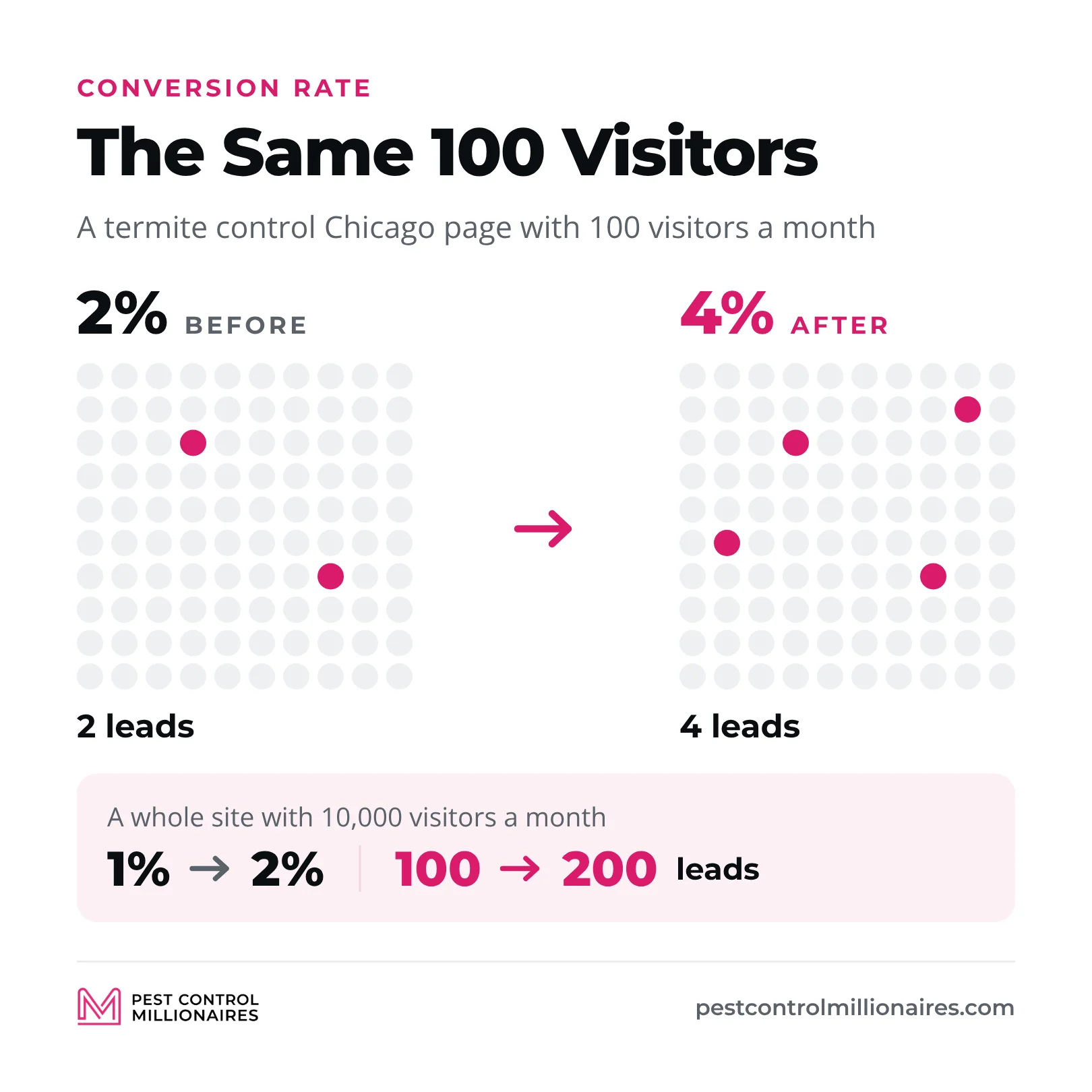
Pest control conversion rate optimization means getting more of the people who already visit your website to call you or fill out a form. Your conversion rate is the share of visitors who become leads, so 100 leads from 10,000 visitors is 1%. My benchmark is your own number. Measure it, then aim to double it, because taking a page from 2% to 4% doubles its leads without another dollar of traffic. The fastest fixes are a sticky click-to-call button, a four-field form on every landing page, a fast page, real photos and reviews, and tracking that shows which pages and sources produce calls. I run Pest Control SEO, an agency that builds and optimizes websites for pest control companies.
Why Conversion Rate Optimization Is the Lowest Hanging Fruit in Marketing
Your traffic is expensive. You pay for it with ad spend on Google Ads, Facebook ads and Local Services Ads, or with the time and money you put into SEO. Once a visitor lands on your site, converting them is basically free. You already paid to get them there.
| Traffic | Conversion rate before | After | Leads |
|---|---|---|---|
| A termite control Chicago page with 100 visitors a month | 2% | 4% | 2 → 4 |
| A whole site with 10,000 visitors a month | 1% | 2% | 100 → 200 |
You didn’t build more backlinks, write more content or rank for new keywords. You made the pages convert better, and every other part of your pest control marketing returns more because of it.
I’ve audited hundreds of pest control websites, and I see the same mistakes over and over. Contact forms that ask for 15 pieces of information. No click-to-call button. Stock photos of bugs instead of real techs. Pages that take 30 seconds to load. No clear offer anywhere. These companies are bleeding leads and don’t even know it.
The Tracking Setup You Need to Know What’s Actually Working
Measure before you optimize. The benchmark that matters is your own conversion rate, and most owners don’t know theirs. My guide to tracking pest control landing page conversions walks through the setup step by step.
The foundation is Google Analytics. If it isn’t on your site, set it up today. Then create key events (what Google Analytics used to call conversions) for the actions that are actually leads.
- A tap on your call button
- A submitted contact form
- A started chat
You can track every call button and every form separately and get as detailed as you want. Just don’t count time on page or pages viewed as conversions. Those tell you how a page is doing, but they aren’t leads.
Call Tracking: Why You Need Different Numbers for Every Source
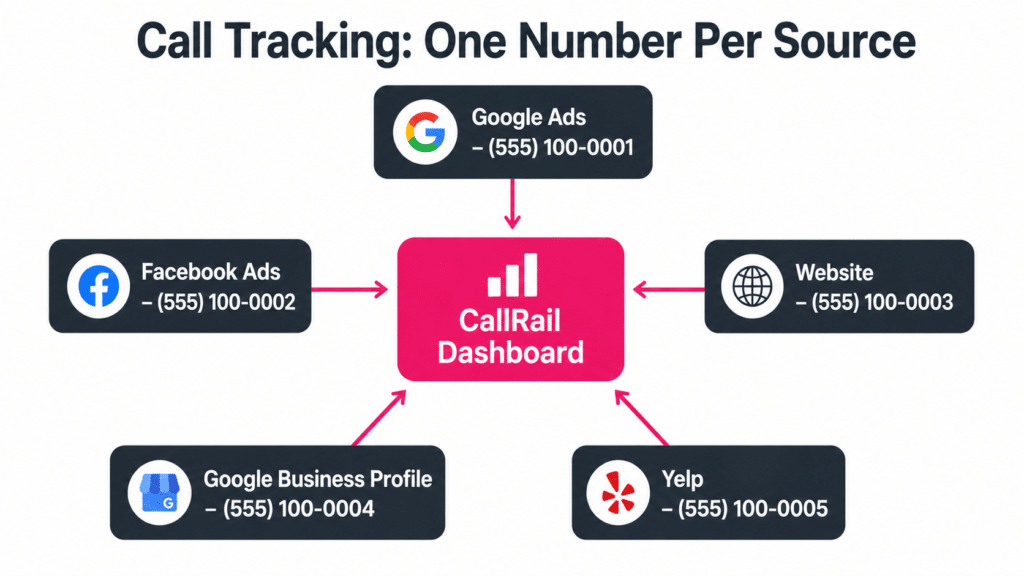 Pest Control Call Tracking – One Number Per Marketing Source
Analytics tells you what happens on your website. Call tracking tells you which marketing is making the phone ring. Use CallRail or GoHighLevel and give every lead source its own number. Each Google Ads campaign, each Google Business Profile, your website and your Facebook ads all get their own.
On your Google Business Profile, put the tracking number in the primary phone field and keep your main number as an additional phone, so your name, address and phone still match your other listings.
If you’re spending the same on two campaigns and one brings 20 calls while the other brings zero, you need to know that so you can move the money. Too many companies use one number for everything and have no idea which channel is working.
The Metrics That Actually Matter (And the Vanity Metrics You Should Ignore)
Most owners obsess over the wrong numbers. “My site got 10,000 visitors last month.” “I’m ranking number one for pest control Chicago.” “My profile got 50,000 impressions.” Great. How many people called you?
Work backwards from what matters. Customers come from leads, leads come from conversions, and conversions come from fast pages with good offers and clear calls to action. If you’re not getting leads, it doesn’t matter how much traffic you have.
Average Engagement Time, the Metric That Predicts Everything
One number I watch closely is how long people actually stay on a page. Google Analytics 4 calls it average engagement time, and you’ll find it in the Pages and screens report. From what I’ve seen, you want people spending at least 30 seconds. If it’s five or 10 seconds, people are landing and leaving, and that’s a speed, relevance or design problem you need to fix.
Conversions also tie into SEO. Say you rank number one for a great keyword, but everyone goes back to Google after five seconds because the page is slow or doesn’t match the search. Google sees that, and it won’t keep showing a page nobody likes, no matter how much SEO work you did. You can’t separate conversion optimization from SEO.
The Audit Process: How to Find What’s Broken
If you’re taking over a site or haven’t looked at your tracking in a while, start at the bottom and work up. Check your call tracking first. How many calls are coming in, and does every lead source have its own number?
Then open Google Analytics. Are key events set up? Which pages get traffic but no leads? Spend an afternoon poking around and be curious. Why did March bring in more leads than February? Why does this one page get tons of visits and nobody converts? Most of the time the problem isn’t the page. It’s that tracking was never set up correctly in the first place.
Why Most Companies Can’t Answer Basic Questions About Their Website
I ask pest control owners four basic questions, and most can’t answer them.
- What’s your conversion rate?
- Which pages bring in the most leads?
- How many people filled out a form last month?
- How long do people stay on your top pages?
That’s the first step. Not optimization, but measurement. Set up Google Analytics, call tracking and key events, then optimize based on what the data tells you.
The Two Main Ways People Convert (And Why Most Sites Mess Up Both)
There are two main ways people convert on a pest control website, and live chat is fast becoming a third.
- Phone calls convert best. Someone sees your number, taps it, and if you answer, you can close them right there.
- Contact forms are the backup for people who are at work, don’t like calling or just prefer a form.
Most sites make both too hard. The phone number is buried at the bottom of the page, or you have to click through to a contact page to find a form. Amazon won online shopping by removing every barrier between “I want this” and “I bought this.” Your site has to remove every barrier between “I have a pest problem” and “I just contacted this company.” I go deeper on this in the website conversion optimization guide.
The Click-to-Call Button Strategy (Why Sticky Headers Matter)
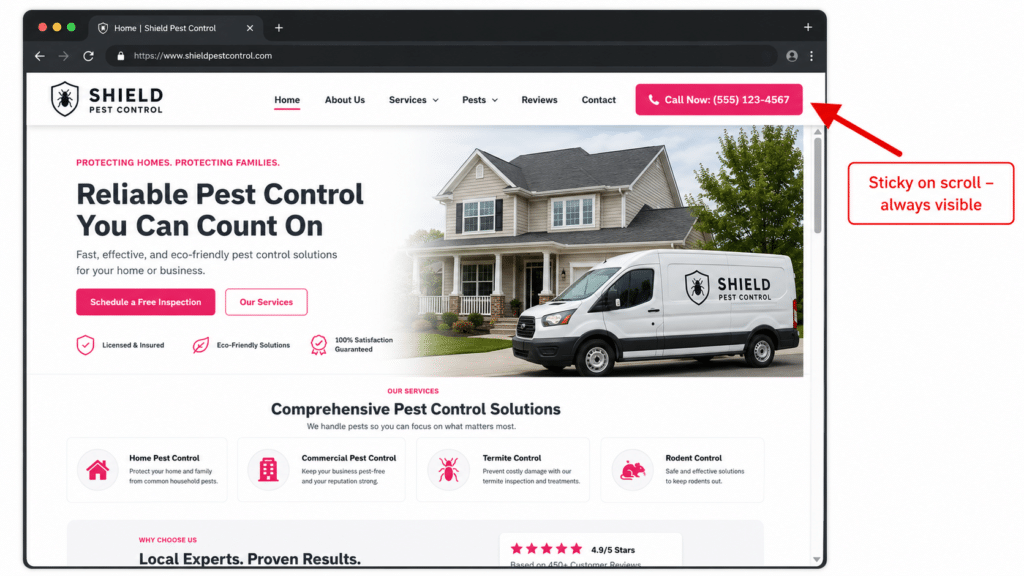 Pest Control Landing Page Sticky Header Mockup
Every pest control website needs a click-to-call button in the top right corner of the header, and the header has to be sticky, meaning it stays at the top while people scroll. Some themes don’t do this by default, so pay extra or switch if you have to. While people read your services and your reviews, that button sits in the corner of their eye the whole time.
- Make it a real tap-to-call button that dials on a phone, not your number written out as text.
- Use a bright color that pops off the screen (bright pink, neon green, electric blue), even if your brand colors are muted.
Contact Forms: How Simple Is Too Simple?
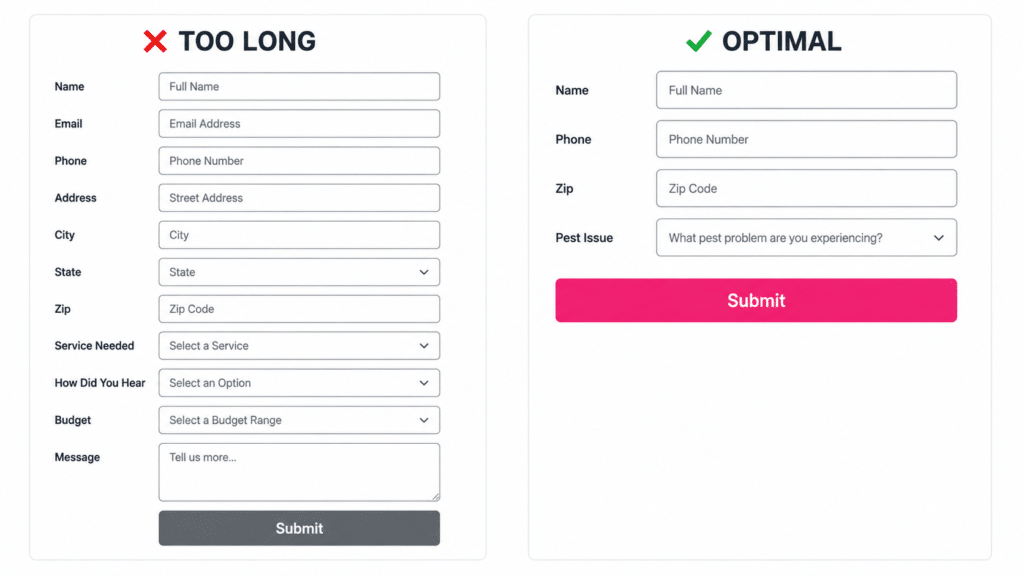 Pest Control Lead Form Length Comparison – Too Long vs Optimal
Every field you add to a form is another brick in the wall. Aaron Weiche, who runs Leadferno and is one of the top people in conversion rate optimization for local businesses, told me that, and it stuck with me.
- For the most leads, ask for four things. Name, phone number, email and zip code. It takes 30 seconds.
- For fewer but more qualified leads, add questions about the pest, the timing or the property, and accept that you’ll lose people at every step.
- For most pest control companies, keep it short and qualify people on the phone.
Put a form on every landing page, ideally in the second section right under the hero. Don’t send people to a separate contact page, because that page has to load too, and they already waited once. Then respond fast. Text back within 30 seconds and call within five minutes, and the automation chapter shows how to set that up.
Live Chat: The Conversion Tool You’re Probably Not Using
Different people want to contact you in different ways, so add live chat as a third option. Podium and Leadferno are popular, and there are free chat widgets too. I like Leadferno because it turns the website chat into a text conversation right away, and texting is how most customers prefer to talk. People ignore email, but they read every text.
Chat will matter even more as people start sending AI agents to websites to book appointments for them, so get a widget on your site now.
Why Your Page Speed Is Killing Your Conversions (And How to Fix It)
Page speed is one of the biggest conversion killers, and most owners have no idea their site is slow. Everything else online loads instantly, so anything slower than about three seconds on a phone feels like forever. If your page takes 10 or 20 seconds, people go back to Google and call your competitor. It doesn’t matter how good your SEO is or how much traffic you drive if people leave before the page loads.
Search “PageSpeed Insights,” paste in your URL, and Google tells you how fast the page loads and what’s slowing it down. The full playbook is in the pest control website page speed guide.
The Three Pieces of a Fast Website Setup
Here’s the setup I use for new sites now, and it’s how we build them at Pest Control SEO.
- Astro builds the site as plain, fast pages.
- Cloudflare Pages hosts it for almost nothing.
- GitHub holds the code, and Claude writes and updates the pages.
There are no plugins to patch and nothing extra slowing the pages down. If your site is already on WordPress, you don’t need to rebuild it to get fast. Use Rank Math for SEO, WP Rocket for speed and Imagify to compress your images.
The Image Compression Mistake That’s Slowing Down Your Site
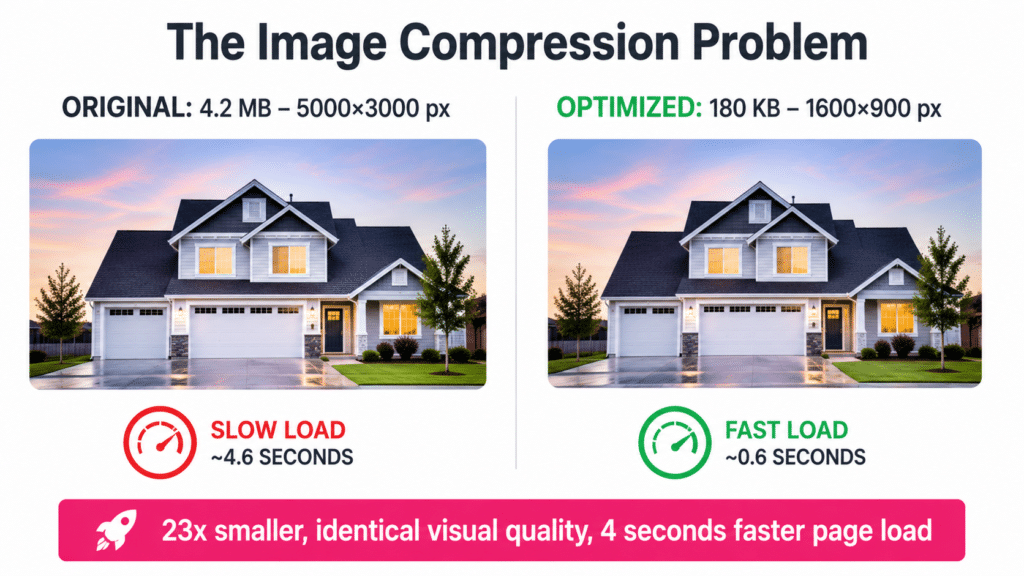 Pest Control Website Image Compression – Slow vs Fast Load Speed
The single biggest thing slowing down most pest control websites is huge, uncompressed images. A photo from a good camera or phone might be 5000×3000 pixels, far bigger than any spot on your page. It looks fine to you, but it makes the page heavy.
Resize each image to the size it actually shows on the page and compress it. You lose a tiny bit of quality nobody notices and gain a lot of speed. On WordPress, Imagify does this automatically for every upload. On an Astro site, images can be resized and compressed automatically when the site is built.
The Plugin Overload Problem (And How to Audit Your Site)
If you’re on WordPress, watch your plugins. I see sites with 50 or more because five different agencies each installed their own tools. Every plugin adds code, too much JavaScript slows everything down, and PageSpeed Insights will tell you if that’s your problem.
Go through the list and delete what you don’t use, carefully, because removing the wrong plugin can break the site. If you’re not technical, have someone who is do it. Most sites run well on 15 to 20.
How Often You Should Check Your Page Speed
Fix speed right away if you know it’s a problem. After that, check your top pages at least once a month and every time you make a big change, like adding plugins, videos or a lot of images. Check your homepage about once a week while you’re making changes.
Apply the 80/20 rule. Twenty percent of your pages probably bring in 80% of your leads, so watch those. If your location pages share one template, keeping the top ones fast usually means the rest are fine too.
The Animation Trap (Why Your Cool Design Is Costing You Leads)
Skip the animations on your money pages. Headings that fade in, images that slide in and text that appears one letter at a time all add load time, and 10 of them on one page add up fast. Speed beats looks on the pages that bring in leads, so save the fancy effects for pages that don’t.
Google Business Profile Optimization: The Easy Wins Everyone Ignores
Your Google Business Profile is far simpler to optimize than your website. There isn’t much you can do on it, which is exactly why you should do all of it, and you can knock out this whole checklist in one afternoon. Ranking the profile is covered in the local SEO chapter, and the conversion details are in the Google Business Profile conversion guide.
| What | Do this | How often |
|---|---|---|
| Posts | Your best offers and testimonials, treated like free advertising | Every week |
| Products | Your top services, named with your city and linked to their pages | Once |
| Photos and videos | Technicians smiling while they work, at least 50 photos and five videos | New photos every month |
| Review replies | A real reply to every review, good or bad | Every review |
| Description and links | Every field filled out | Once |
Google Posts: Your Free Billboard That Nobody Uses
Treat posts like a mini billboard, not social media. Darren Shaw, one of the top people in local SEO, told me not to use them for tips or helpful content, because that’s not what converts.
- Post your offers, like $50 off your first service, a free termite inspection or mosquito control free with an annual plan.
- Add your top testimonials and your best services.
- Rotate them every week so they stay fresh.
Products on Google Business Profile (Why You Should Use Them Even Though Nobody Sees Them)
Google still lets home service companies add products, which honestly surprises me, and almost nobody uses them.
- Add your top services as products (termite, mosquito, bed bug, rodent and general pest control).
- Make them local, like Termite Control Chicago, and link each one to its matching page on your website.
- They sit near the bottom of the profile, but if your competitor has 20 and you have none, that small difference can tip someone toward them.
Photos and Videos: Why Technicians Smiling Beats Everything
The formula is simple. A technician smiling while doing something. Smiling in the van, while spraying, in an attic, with a customer. People want to see who’s coming into their house.
- Get at least 50 photos and five videos on each profile. Follow a tech for a day and you’ll have the photos in an hour or two.
- Videos don’t need to be professional. A tech finding termites in a crawl space or a before-and-after of a lawn treatment works.
- Reuse the videos you already make for YouTube and social media.
Review Replies: The Conversion Factor Nobody Thinks About
Prospects read how you treat your customers, so reply to everything.
- Thank five-star reviewers by name and mention something specific they said. It takes 60 seconds.
- For a one-star review, stay calm, acknowledge it, apologize and offer to make it right.
- Never lose your cool in public. A local SEO expert on my podcast told me about a restaurant owner who answered a wave of fake one-star reviews with “I hope you die in a car accident.” Don’t be that guy.
Why One-Star Reviews Aren’t the End of the World
One bad review won’t sink you. A perfect 5.0 with 10 reviews looks fake, and people trust a 4.5 to 4.9 with hundreds of reviews more. You’d rather buy the Amazon product with 15,000 reviews at 4.5 stars than the one with 10 reviews at 5.0. Stop stressing over single reviews and keep collecting new ones.
Landing Page Structure: The Hero Section That Converts
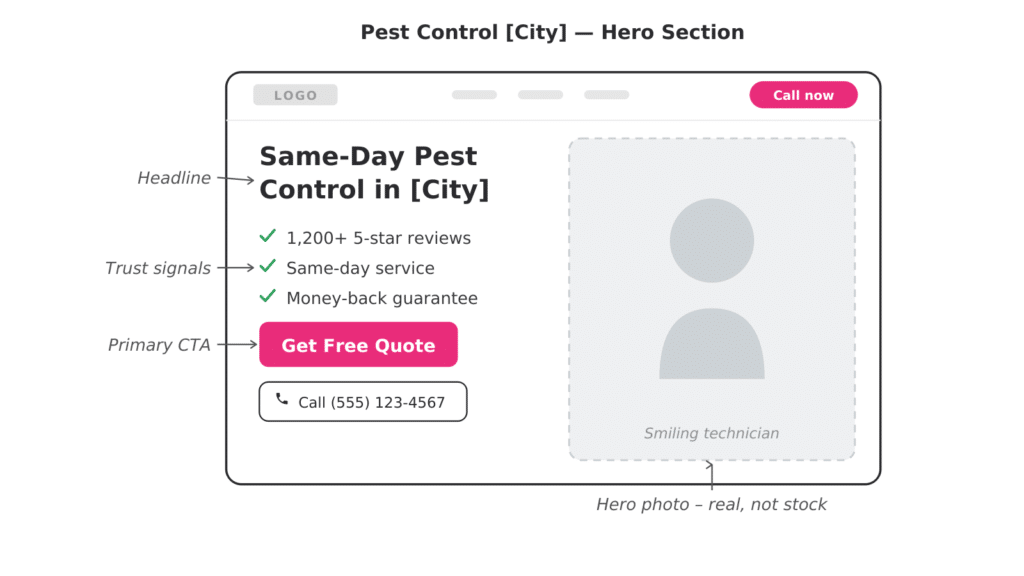 Pest Control Landing Page Hero Section Wireframe
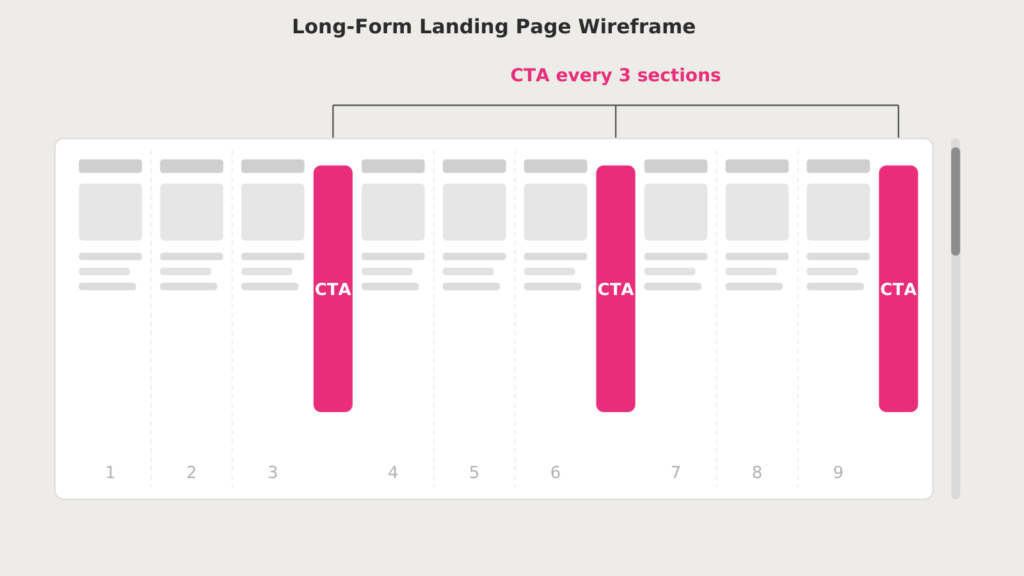 Long-Form Pest Control Landing Page Wireframe
Your money pages, like termite control Chicago or pest control Phoenix, all start with a hero section that grabs attention, builds trust and pushes for the call. The pest control landing page guide breaks down every section.
- On the right, a real photo of one of your technicians, ideally smiling and doing something.
- On the left, a headline that calls out the search. “Are you looking for termite control in Chicago?” They just clicked from Google or an ad, so you’re confirming they’re in the right place.
- Under the headline, a line that builds trust. “You landed in the right place. Green Day Pest Control has been serving the Chicago area for 10 years, and we’re locally owned and operated.”
- Then a clear call to action and a big, bright call button.
Put the call button in the hero instead of a form, since a call is the highest-converting action, and save the form for the second section.
Why Your Landing Pages Need Multiple Calls to Action
Don’t make people scroll the whole page before they can convert. Call them to action every three sections. Some visitors are sold the moment they land. Others want to read about your process, the most common pests in the area and your reviews first, so give them another button or form right when they’re ready.
End the page with your strongest call to action, maybe a better offer. Anyone who scrolled all the way to the bottom is a warm lead, so don’t lose them at the finish line.
The Duplicate Content Trap (Why Every Location Page Needs to Be Unique)
A lot of companies build a location page for every city and change only the city name. Pest control Chicago, Naperville and Aurora, all with the same text and photos. Google sees duplicate content and may rank one of those pages or none of them, and visitors can tell it’s generic.
Make each page unique with the most common pests in that city, a story from a job in that neighborhood, the suburbs you serve there and photos from local jobs. People want a company that knows their area.
Trust Signals: Reviews Widgets That Actually Work
Reviews are your strongest trust signal, so put them on every landing page with a widget that pulls from your Google Business Profile. On WordPress, a plugin like Google Reviews Widget does it, and most review widget tools give you a snippet you can paste into any site.
- Put it at the bottom of the first section or the top of the second, after your call to action.
- Let it scroll automatically so people see review after review.
- Pull from your profile with the most reviews. If one location has 500 and the others have 20, use the one with 500.
Customer Testimonials: How to Do Them Without Looking Fake
Don’t pair review text with a stock photo of a stranger. People can tell. Use a selfie of your tech with the customer instead, or better, a 30 to 60 second video.
The easiest way to get a video testimonial is a conversation, not a script. Your tech asks, “Hey Sally, tell me about your experience today,” and the customer just talks. Most people freeze up on camera, and the interview format fixes that. It feels real, it builds trust, and you can use it on your website, your Google Business Profile, Facebook and YouTube.
Why You Should Never Use Stock Photos on Landing Pages
Stock photos kill trust, and they make your company seem fake. Even a mediocre photo from your iPhone beats a polished stock photo, because it’s real. Show your real techs doing real work in real houses. With AI making fake content easier than ever, people want real more than ever.
How to Test Changes Without Hurting SEO
You don’t need split-testing software. Pick two location pages that get similar traffic and convert at about the same rate, change one thing on one of them, and compare their conversion rates in Google Analytics. If the changed page wins, roll the change out to your other pages. You get a real answer without putting your best-ranking pages at risk.
The Quick Wins You Can Implement This Afternoon
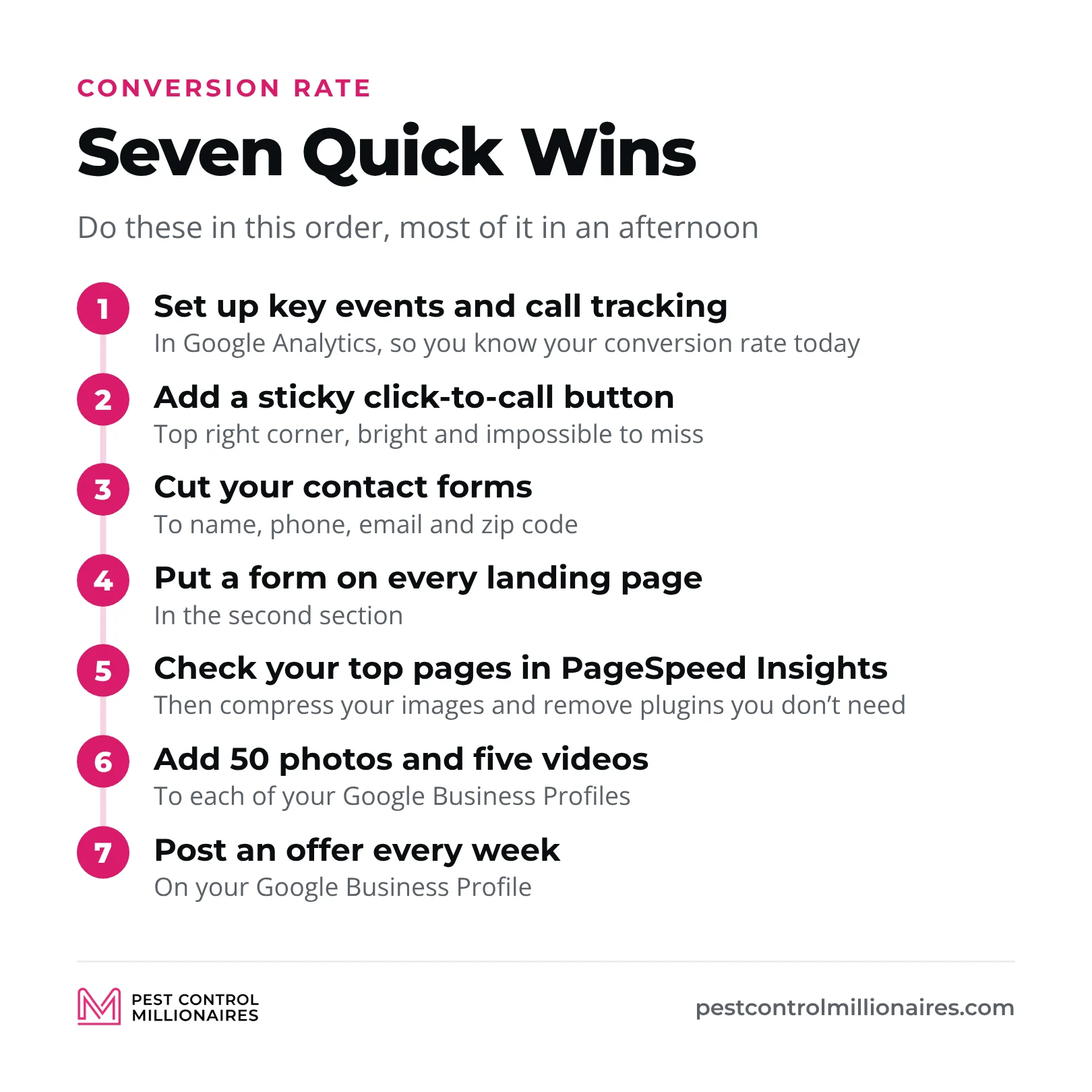
If you only do a few things after reading this guide, do these, in this order.
- Set up Google Analytics key events and call tracking, so you know your conversion rate today.
- Add a sticky click-to-call button in the top right corner. Make it bright and impossible to miss.
- Cut your contact forms to name, phone, email and zip code.
- Put a form on every landing page, in the second section.
- Check your top pages in PageSpeed Insights, then compress your images and remove plugins you don’t need.
- Add 50 photos and five videos to each of your Google Business Profiles.
- Post an offer on your Google Business Profile every week.
You can knock out most of that in an afternoon. Then go deeper with your landing page layout, unique location pages, review widgets and video testimonials. A 10% improvement here and a 5% improvement there add up, and you’re not spending a dollar more on traffic to get them.
Frequently Asked Questions
What is a good conversion rate for a pest control website?
It varies by market and traffic source, so the benchmark I use is your own number. Measure what your pages convert today and aim to double it, the way a page going from 2% to 4% doubles its leads without more traffic.
How do I increase my pest control website conversion rate?
Track calls and forms first so you know your starting rate. Then add a sticky click-to-call button, cut your form to name, phone, email and zip code, put a form on every landing page, speed up your pages and show real photos and reviews.
What elements should a high-converting pest control landing page have?
A hero section with a headline that calls out the search (“Are you looking for termite control in Chicago?”), a real photo of a smiling technician and one big call button, with a short form in the second section. Below that come reviews, your process and the most common local pests, a call to action every three sections and your strongest offer at the bottom.
How important are online reviews for pest control conversions?
Very. Reviews are your strongest trust signal, so show them on every landing page with a widget pulled from your profile with the most reviews, and reply to every review, because prospects read how you treat your customers.
Does website speed affect pest control lead generation?
Yes. If a page takes more than about three seconds to load on a phone, people go back to Google and call someone else, so test your top pages in PageSpeed Insights, compress big images, cut plugins you don’t use and skip animations.
How do I A/B test my pest control website for better conversions?
You don’t need split-testing software. Change one thing on one of two location pages that get similar traffic and convert at about the same rate, compare the two in Google Analytics, and roll the change out to your other pages if it wins.
Related Articles