Pest Control Facebook Ads: How to Get $10 Leads That Actually Close

Table of Contents
- Pest Control Facebook Ads Benchmarks
- Why Lead Ads Beat Everything Else (And It’s Not Even Close)
- The Close Rate Reality Check (Stop Comparing Facebook to Google)
- The $600 Per Month Budget Threshold (Why Spending $300 Won’t Work)
- What Actually Stops People From Scrolling (Bright Colors and Pain Points)
- Still Images vs. Video (And Why Most People Mess Up Video)
- The Headline Formula That Actually Converts
- The Ad Copy Structure That Actually Works
- Why Your Ad Will Fail If You Include Your Phone Number
- How to Get Facebook Leads That Actually Close (Call Within Five Minutes)
- Top of Funnel Brand Awareness Ads (And Why You Probably Don’t Need Them)
- Who to Target First (Women 35 to 55 Interested in Home and Garden)
- Never Target Anyone Under 28 Years Old (You’re Just Wasting Money)
- Lookalike Audiences (The Secret Weapon Nobody Uses)
- Radius vs. Zip Code Targeting (And When to Use Each)
- How Specific Can You Actually Get With Targeting?
- Why Weather Destroys Your Campaigns (And How to Plan Around It)
- The A/B Testing Framework That Actually Works
- What Actually Indicates a Winning Ad
- The Testing Timeline Nobody Talks About
- How to Spy on Your Competitors’ Ads (Legally)
- Retargeting: The Secret to Converting People Who Didn’t Buy the First Time
- How Far Back to Retarget (My 90-Day Rule)
- The Biggest Mistakes That Kill Facebook Ad Performance
- The Real Timeline: When You’ll Actually See Results
- Frequently Asked Questions
- Related Articles
Pest control Facebook ads work when you run lead ads (the form opens inside Facebook), spend at least $600 a month ($20 a day), test four ads at a time and call every lead within five minutes. Expect about $10 to $20 per lead and a 20 to 30% close rate. That’s lower than Google, but because the leads are so much cheaper, a customer ends up costing close to what one from Google does (about $150 on Meta and $130 on Google at Pest Badger). Give any campaign 90 days before you judge it.
I’m Jake Sheldon, the original founder of Pest Control Millionaires. I’ve helped more than 400 pest control companies with lead generation, and I run Facebook ads for my own service companies.
Pest Control Facebook Ads Benchmarks
These are the numbers I plan around. Each one is explained further down the page.
| What | Benchmark |
|---|---|
| Cost per lead | About $10 to $20 |
| Close rate | 20 to 30% is good on Facebook (Pest Badger runs 22 to 25%). Google leads close at 70 to 90% |
| Cost per customer | Close to Google’s, because the leads cost so much less. About $150 at Pest Badger, against $130 on Google |
| Minimum budget | $600 a month ($20 a day) |
| Ads running | At least four variations at all times |
| Test length | 3 to 7 days per variable, one variable at a time |
| Time to judge a campaign | 90 days |
| Age | Nobody under 28. Start with women 35 to 55 |
| Retargeting window | 90 days is my rule. Meta keeps website visitors up to 180 days |
| Speed to lead | Text within 30 seconds, call within 5 minutes |
Why Lead Ads Beat Everything Else (And It’s Not Even Close)
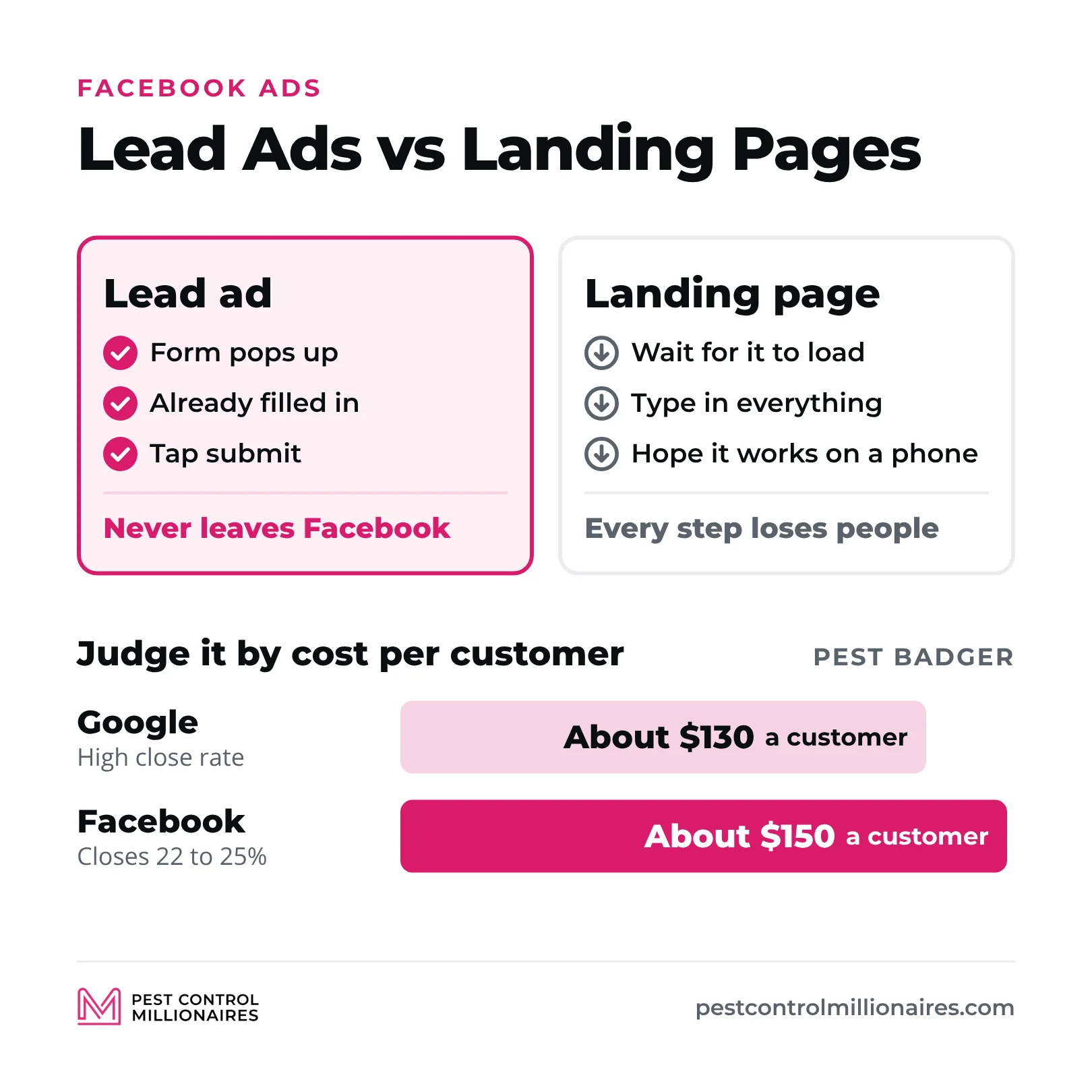
Facebook offers dozens of campaign objectives, from traffic and engagement to video views and messages. For pest control companies, only two really matter, lead ads and conversion ads. Lead ads are my absolute favorite, because the person never leaves Facebook.
When someone clicks your ad, a form pops up right inside Facebook with their name, email and phone number already filled in, because Facebook knows everything about everyone. They just tap submit.
Why does that matter? Because Facebook wants people to stay on its platform. The longer you’re scrolling, the more ads it can show you. So when your lead ads keep people inside Facebook, the algorithm rewards you. Your ads reach more people, your cost per lead drops and everything works better.
Conversion ads send people to a landing page on your website. They have to click the ad, wait for the page to load, type in all their information and hope the form works on their phone. Every one of those steps is a place where people drop off, and Facebook doesn’t love it when you take people off its platform.
Conversion ads can work. You can grab the same information either way (name, phone, email, zip code and the pest problem). But in my experience, lead ads consistently outperform conversion ads for service businesses like pest control and lawn care.
The one real downside is that lead ad leads aren’t quite as qualified as someone who went through your whole website and filled out a form. But the volume is so much higher and the cost so much lower that it more than makes up for it. I walk through the setup in Facebook ads setup for pest control.
The Close Rate Reality Check (Stop Comparing Facebook to Google)
This is critical, so I’m going to say it again. If you’re closing 20 to 30% of your Facebook leads, you’re doing great.
I see companies start running Facebook ads, get a bunch of leads, and then panic because they’re only closing one out of every four. They think something is broken. They think Facebook doesn’t work. They think the leads are garbage.
No. That’s just how Facebook works.
Google Ads are intent-based. Someone searches “pest control near me” because they want pest control right now. Your close rate should be 70, 80, even 90% on those leads.
Facebook advertising for pest control is disruptive marketing. You’re interrupting someone’s day, making them aware of a problem they didn’t know they had and convincing them to act. These people weren’t searching for you. You found them.
So your close rate is lower. But look at what a customer costs. Say you’re paying $100 per lead on Google and closing 80%. That’s $125 per customer. Pest Badger closes 22 to 25% of its Facebook leads, and once everything it spends to win them is counted, sales commissions included, a customer from Meta costs about $150, against about $130 on Google.
That’s a much lower close rate at almost the same cost per customer. Stop comparing Facebook to Google on close rate. They’re different platforms with different strengths. Use both, and understand what you’re getting from each one.
The $600 Per Month Budget Threshold (Why Spending $300 Won’t Work)
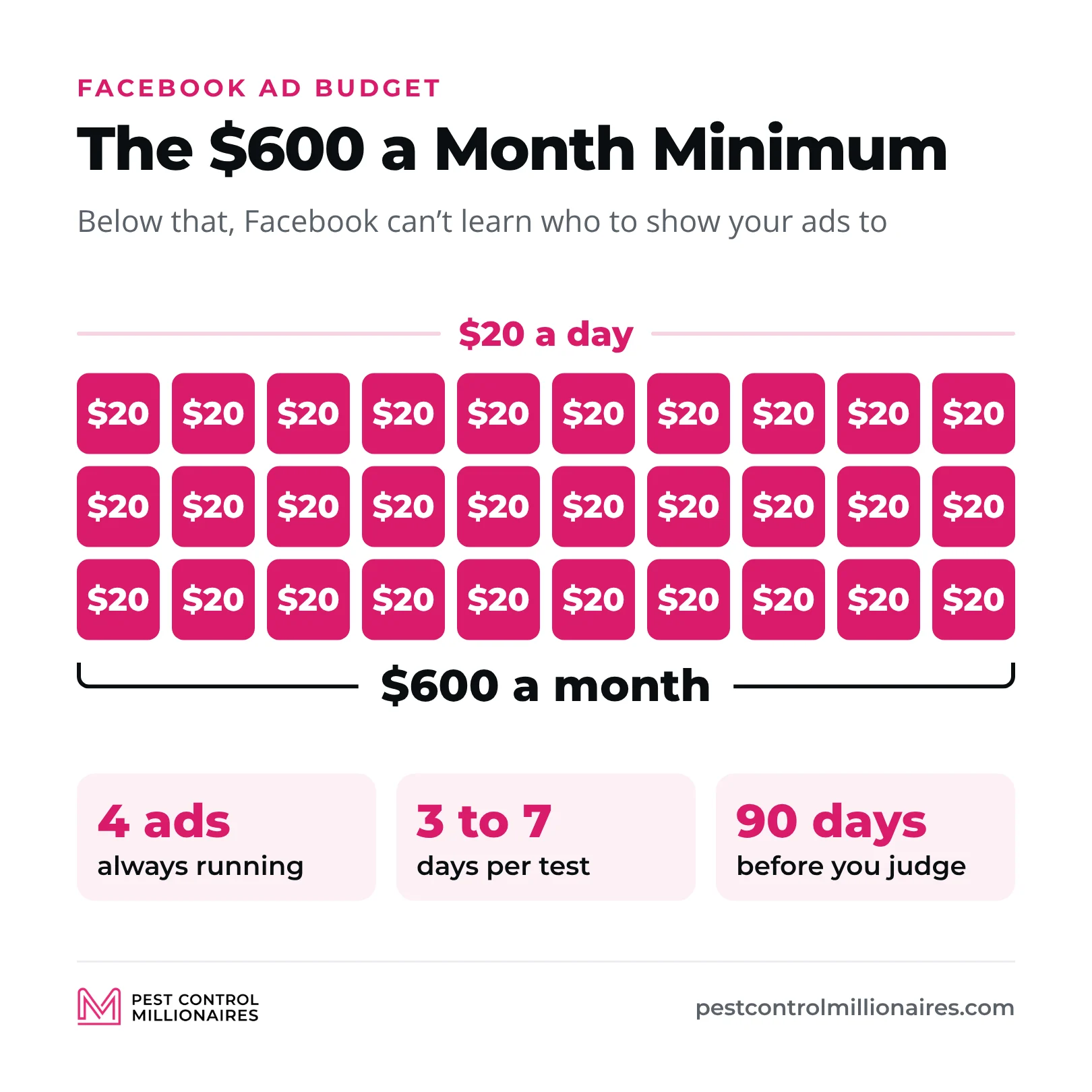
Facebook has a threshold at $600 a month, or $20 a day. If you’re not spending at least that much, you’re not going to get good results.
Here’s why. Facebook works like an auction. You’re bidding against every other advertiser for people’s attention, not just other pest control companies. The local HVAC company, the plumber, the realtor and the e-commerce store selling shoes are all competing for the same eyeballs.
If you’re only spending $10 a day while your competitor is spending $20, Facebook is going to show their ads more than yours. If someone else is spending $500 a day, they’re going to dominate the feed while you’re barely visible.
I’ve heard people say they spent $300 or $400 on Facebook and got nothing. Of course they didn’t. They didn’t spend enough for the algorithm to even figure out who to show the ads to.
Commit to at least $600 a month, $20 a day minimum. That’s the baseline to get Facebook working properly. Can you spend more? Absolutely. Should you? That depends on your market and your goals. But don’t go below that threshold and expect results.
And please, for the love of everything, do not use the “boost post” button. That’s not the same as running a real campaign, and boosted posts are basically throwing money away. Always run ads through Ads Manager.
What Actually Stops People From Scrolling (Bright Colors and Pain Points)
This is probably the most common question I get. What should I actually put in my image or video to make people stop scrolling? It comes down to two things, disruption and pain points.
Everyone on Facebook is in what I call low-state hypnosis. They’re doom scrolling, swiping through their feed, not really paying attention to anything. Your job is to break that pattern and snap them out of it.
How? Bright colors and strong hooks. If everyone else is using dark, muted colors, use bright colors that pop off the screen. If everyone else has calm, professional images, use something that catches the eye. You’ve seen those Alex Hormozi ads where he’s falling off a stretcher or doing something ridiculous. That’s disruption. For pest control, you don’t need to be that extreme, but you do need to stand out.
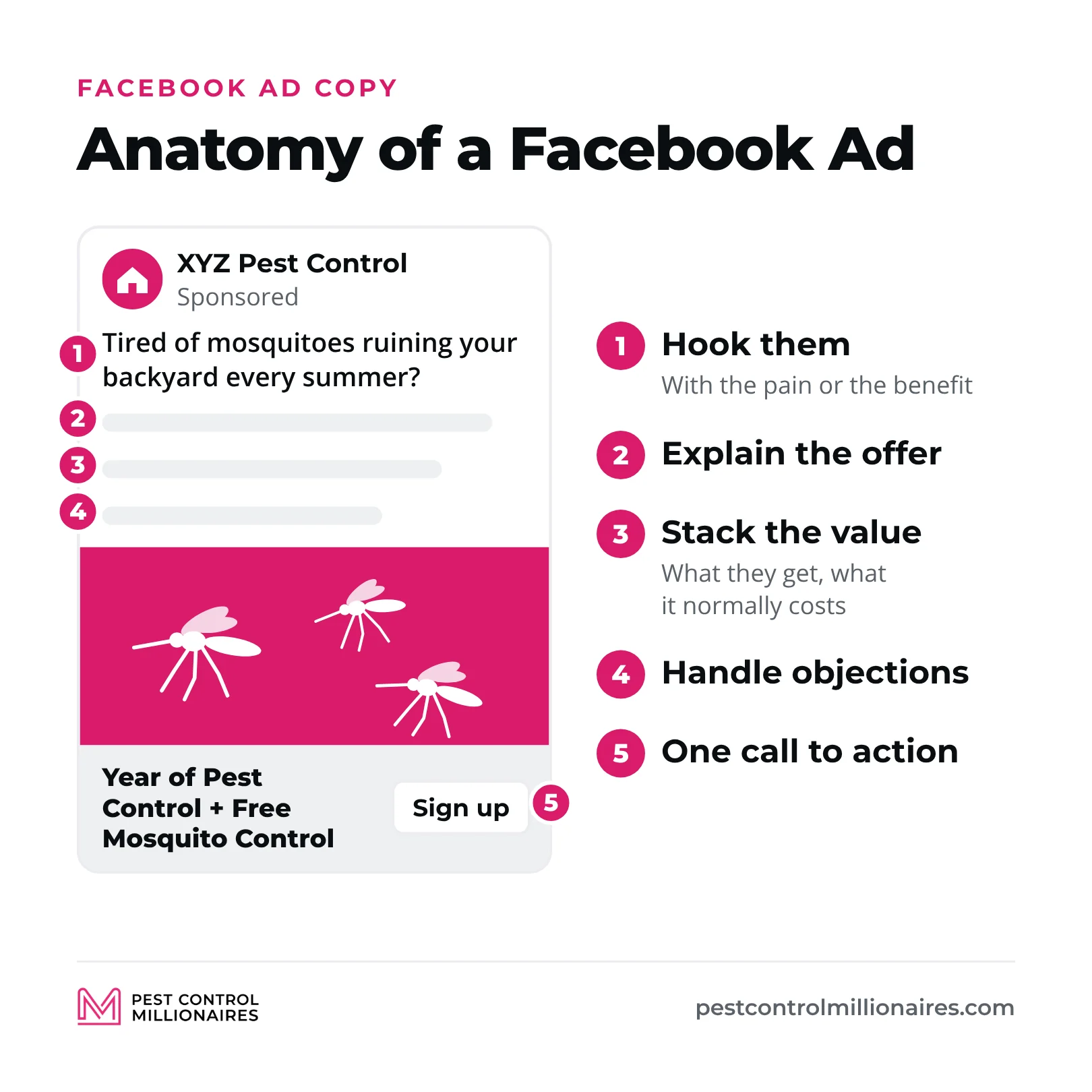
The second element is showing the pain point in the image or video. If you’re running a mosquito ad, show someone getting eaten alive by mosquitoes. Show a hand covered in mosquito bites. Show a family trying to enjoy their backyard while getting swarmed.
Don’t show your solution yet. Don’t show your smiling tech standing next to the truck. That’s fine for Google ads, billboards and other branding, but it doesn’t work for Facebook lead ads. Show the problem first.
I’ve run ads with a nasty picture of someone’s hand covered in mosquito bites, and that ad crushed. It was uncomfortable to look at, which is exactly why it worked. People stopped scrolling, recognized their own mosquito problem and filled out the form.
Before and after pictures work incredibly well too, especially for lawn care. Show the dead, patchy lawn next to the green, lush one. The contrast tells the story instantly. More examples in Facebook ad creatives for pest control.
Still Images vs. Video (And Why Most People Mess Up Video)
I prefer still images for Facebook ads, especially if you’re just getting started. Images are easier to create, faster to swap out, and you can test new creative constantly without a full video production. Take a picture with your phone and you can have a new ad running in 10 minutes.
Video can work incredibly well, but there’s a catch. You have to be good at video. You need to know how to hook people in the first three seconds, hold their attention and deliver a message that converts. If you haven’t studied video or spent time learning the craft, don’t start with video ads. You’ll waste a ton of money on video that doesn’t convert.
That said, simple videos can work. Follow a technician doing a service and do a time-lapse. Show the before and after of a treatment. Show a tech finding a massive termite problem in someone’s crawl space. Authentic, documentary-style videos can perform well without fancy editing.
But honestly, start with images. Get them converting consistently, then experiment with video.
One exception. Video testimonials absolutely crush. If you can get a customer to record a quick 30-second video about your service, that makes an incredible ad. It’s authentic, it builds trust, and it’s someone else selling your service for you.
The Headline Formula That Actually Converts
Your headline is critical. Some people say it’s 80% of the ad, others say 50%. I don’t know the exact number, but I know it’s extremely important. Your headline should summarize your offer clearly and simply.
If you’re running an ad for pest control and mosquito control bundled together, your headline could literally be “Pest Control + Mosquito Control – $67.” Simple. Clear. They know exactly what they’re getting and what it costs.
Or take an offer Jonas and I have both run. “Year of Pest Control + Free Mosquito Control.” That’s the headline. It tells them exactly what the deal is without any fluff.
Here’s what you should never put in your headline. Your phone number, your company name, generic phrases like “call us today,” or anything that doesn’t directly communicate your offer.
I see this all the time. People put their business name in the headline. Nobody cares about your business name yet. They don’t know you. They don’t trust you. They just want to know what you’re offering and what it costs. Save the business name for later and put your offer in the headline.
The Ad Copy Structure That Actually Works
Here’s where Facebook ads are completely different from organic posts or Facebook group posts. In groups and organic content, you lead with value. You’re building trust and authority, and you’re not being salesy because that’s not what those places are for.
In Facebook ads? You can be as salesy as you want. People can see it says “sponsored” right at the top. They know it’s an ad. So don’t disguise it as a helpful tip. Just sell them on your service.
We have ad copy formulas that work consistently, and they follow a simple structure.
- Hook them with the pain point or the benefit
- Explain the offer clearly
- Stack the value (what they get, what it normally costs, what problems it solves)
- Handle objections
- Give a clear call to action
Here’s an example. “Tired of mosquitoes ruining your backyard every summer? We’ll treat your whole property with our mosquito barrier service all season long. Get your first treatment for just $49 when you sign up for our seasonal plan (normally [your regular price]). We’ve helped [number] families in [your city] take back their yards. Click below to claim your spot before mosquito season hits.”
Fill in the brackets with your real numbers. Simple, direct, clear. No fluff, no storytelling, no trying to be clever. Just tell them what you’re offering and why they should care. Lead with the hook, because Facebook cuts longer text off behind “See more.”
Why Your Ad Will Fail If You Include Your Phone Number
This is a mistake I see constantly. People put their phone number in the ad copy or the headline. Don’t do this.
If you put your phone number in the ad, people call you directly instead of filling out the form. That sounds great, except Facebook has no way to know those people called you. As far as Facebook knows, your ad got zero conversions. So the algorithm thinks your ad isn’t working, stops showing it, your cost per lead goes up and your performance tanks.
Let them fill out the form first. Once they submit it, you call them immediately. Just don’t give them a way to skip the form.
The only time you might break this rule is a straight call campaign where you’re paying per call, but that’s a completely different strategy.
How to Get Facebook Leads That Actually Close (Call Within Five Minutes)
Cheap leads only matter if you close them, and Facebook leads go cold fast. They filled out your form while scrolling, and a lot of them are filling out forms for other companies too. Whoever gets to them first usually wins.
When I called leads back whenever I had time, I closed 10 to 15% of my Facebook leads. Once every lead got a text in 30 seconds and a call within five minutes, my close rate on the same ads climbed well past the 20 to 30% benchmark. Here’s the first day for every new lead.
| When | What happens |
|---|---|
| Within 30 seconds | Automated text with your name, your company and that you’ll call in a few minutes |
| Within 5 minutes | First call. No answer? Hang up and call right back |
| Still no answer | Leave a short voicemail with who you are, why you’re calling and how to reach you |
| 3 to 4 hours later | Call again, back to back if they don’t pick up |
| That evening | Call again, back to back |
| Days 2 to 7 | At least one text and one call a day |
Set it up once in your CRM and it runs while you’re on a route. The texts, the voicemail script and the long-term follow-up are in the automation chapter. Before you automate texts and repeat calls, check your state’s rules on texting consent and call attempts. Some states cap sales calls to the same person (Florida allows three in 24 hours).
Top of Funnel Brand Awareness Ads (And Why You Probably Don’t Need Them)
A lot of people ask if they should run brand awareness ads at the top of the funnel. My answer is that you probably don’t need to.
Here’s why. Facebook is already doing branding for you with your lead ads. Every time someone sees your ad, even if they don’t click, they see your company name, your logo and your message. That’s free branding on top of the leads.
The companies that run separate brand awareness campaigns are huge companies with massive budgets. They can afford ads that don’t directly generate revenue because they’re playing a different game. Smaller pest control companies need a return on ad spend. You need leads that turn into customers.
Stick with lead ads. You’ll get the branding as a side benefit while you generate leads you can call and close.
Who to Target First (Women 35 to 55 Interested in Home and Garden)
Facebook’s targeting is scary good. It knows what people like, what they engage with and which websites they’ve visited. For pest control companies, that means we can put ads in front of exactly the right people.
The audience I start with is women between 35 and 55 who are interested in home and garden and shows like HGTV.
Why women? Because in most markets, women make the decisions about home services. They’re more likely to click the ad, fill out the form and book the service.
Why 35 to 55? Because that’s the age range where people own homes and have money to spend on pest control.
Why home and garden? Because those are homeowners who care about their property.
This isn’t true in every market. In Florida, California, Arizona and other places where lots of people are retired, I see more men clicking on ads, so I test both genders there. But women 35 to 55 is my starting point. More on building audiences in Facebook ads targeting for pest control.
Never Target Anyone Under 28 Years Old (You’re Just Wasting Money)
This is a huge mistake I see all the time. People target 18 to 29 year olds. Stop. You’re throwing your money away.
How many 20-year-olds own homes? Almost none. They’re renting apartments. They don’t have the budget or the authority to hire you, and they’re not your customer.
My rule is simple. Nobody under 28. Start at 35 to 55, and when you test age (the testing order is below), test four bands, 30 to 44, 45 to 54, 55 to 64 and 65+. Every dollar you spend showing ads to 22-year-olds is a dollar wasted.
One catch. If your ad set uses Meta’s Advantage+ audience, the age range you enter is only a suggestion, and the minimum age control only goes up to 25. To keep your ads away from people under 28, switch that ad set to the original audience options and set the age range there.
Lookalike Audiences (The Secret Weapon Nobody Uses)
Lookalike audiences are one of the most powerful features in Facebook ads, and most pest control companies have no idea they exist.
Here’s how they work. You give Facebook a list of your best customers, and Facebook finds other people who look like them.
Say you have 3,000 customers in your database. You export that list from your CRM or lead management software, upload it to Facebook and create a lookalike audience. Facebook studies those 3,000 people (age, interests, behaviors) and finds other people in your area who match.
You can also build lookalikes from people who like your Facebook page. If you have 10,000 followers, Facebook can find people similar to those 10,000 and show them your ads.
You’re not guessing who your ideal customer is. You’re using real data from real customers who already hired you, and finding more people like them. It’s almost creepy how well it works.
Radius vs. Zip Code Targeting (And When to Use Each)
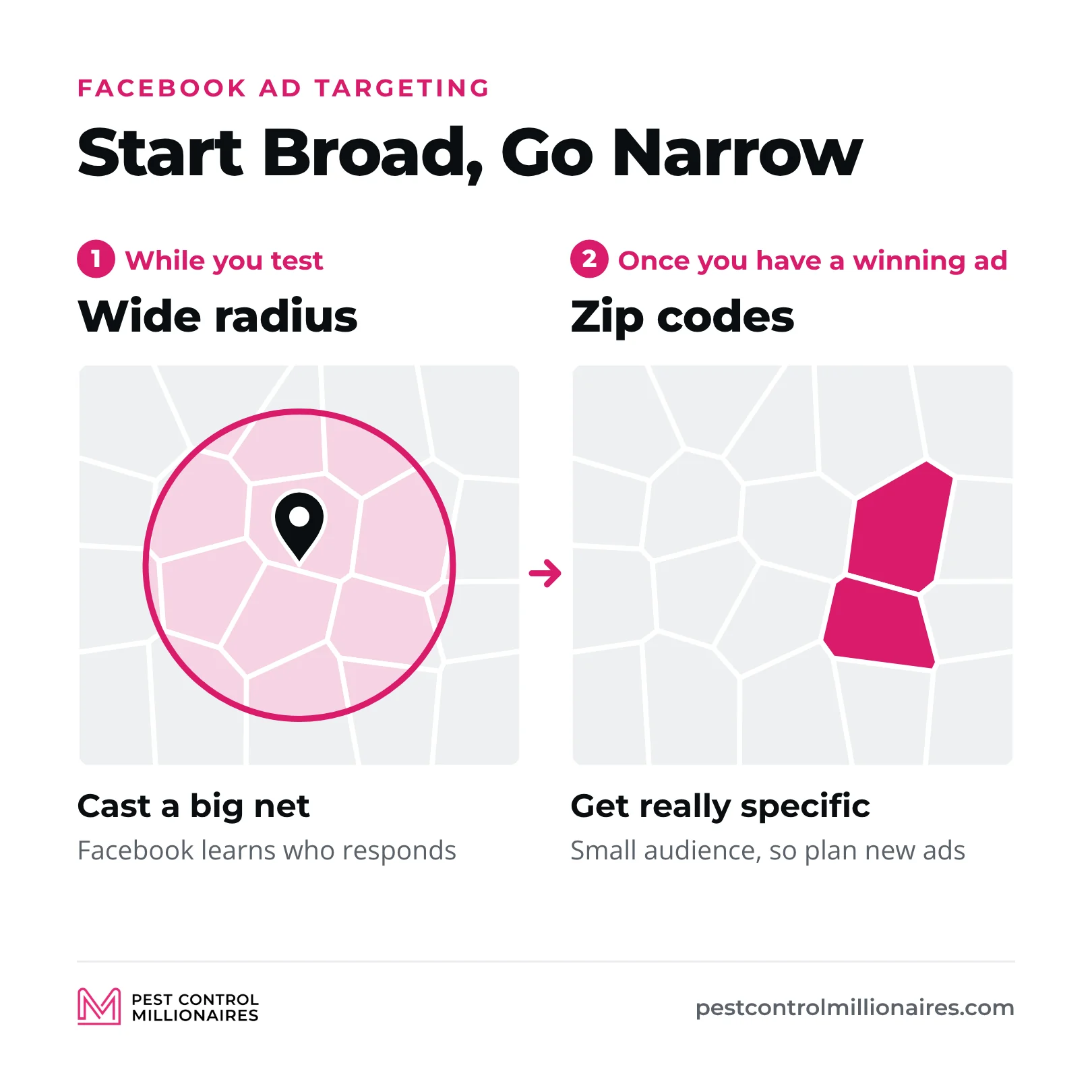
When you’re first starting with Facebook ads, I recommend a wide radius to cast a big net.
Think of it like fishing. You throw out a wide net to see what you catch. You’ll get some green fish (ideal customers), some blue fish (okay customers), some yellow fish (bargain hunters) and some red fish (people who are going to be a nightmare).
That’s fine, because you’re gathering data. You’re figuring out which offer works, which creative resonates and which message converts. Facebook is also learning who responds to your ads and who becomes a customer.
Once you have a winning ad (the right offer, creative and message), switch to zip code targeting and get really specific.
Here’s an example. Say there’s a lake community called Dory that’s getting hammered with mosquitoes. I could create an ad just for Dory residents. “Hey, this is [your name], owner of XYZ Pest Control. I’m going to be in the Dory neighborhood for the next seven days doing mosquito treatments. We’re offering a special discount just for Dory residents, and it ends in seven days.”
That ad is going to crush because it’s hyper-specific. People in Dory see it and think, “This was made for me.”
The downside is that the audience is small, so you’ll burn through it quickly and need new ads for other neighborhoods. But because it’s so targeted, it converts incredibly well.
Start broad with radius targeting. Once you find what works, go narrow with zip codes.
How Specific Can You Actually Get With Targeting?
Facebook lets you target down to a one-mile radius. That’s insanely specific. You could target a single neighborhood or the area around a park or a lake.
The smaller your radius, the more specific your message can be, and the more specific your message, the higher your conversion rate. But you also burn through that audience faster, so you need to create new ads constantly if you go hyper-local.
Most of the time, I use a broader radius to get volume. For special campaigns or seasonal pushes, one-mile targeting can produce incredible results.
Why Weather Destroys Your Campaigns (And How to Plan Around It)
Seasons and local events massively affect Facebook ad performance. I’ve seen daily rain change results. If you’re about to launch your first Facebook campaign and there’s a tornado warning or a hailstorm coming, don’t launch. Your results will be terrible.
People are distracted by the weather. They’re worried about the storm, not pest control. Your ad will flop even though there’s nothing wrong with it.
Launch your campaigns when it’s bright and sunny. People are in a good mood, thinking about enjoying their yard and noticing pests around the house.
The exception is rodent and bed bug ads. Those are indoor problems, so weather doesn’t matter as much, and you can run them year-round.
For anything outdoors (mosquitoes, ants, general pest control), be smart about the forecast. Don’t launch a mosquito campaign the day before a week of rain. And here’s a pro tip. Run your ant ad the day after heavy rain. Everyone’s house is going to be full of ants escaping the water, and your ad will crush.
The A/B Testing Framework That Actually Works
A/B testing is the second most important part of Facebook ads, right after having a disruptive ad in the first place. If you’re not testing, your ads probably won’t work. It’s that critical.
You don’t know what’s going to work in your market until you test it. An offer that crushes in Dallas might bomb in Des Moines. A creative that works in Florida might fail in Nebraska. Every zip code is different.
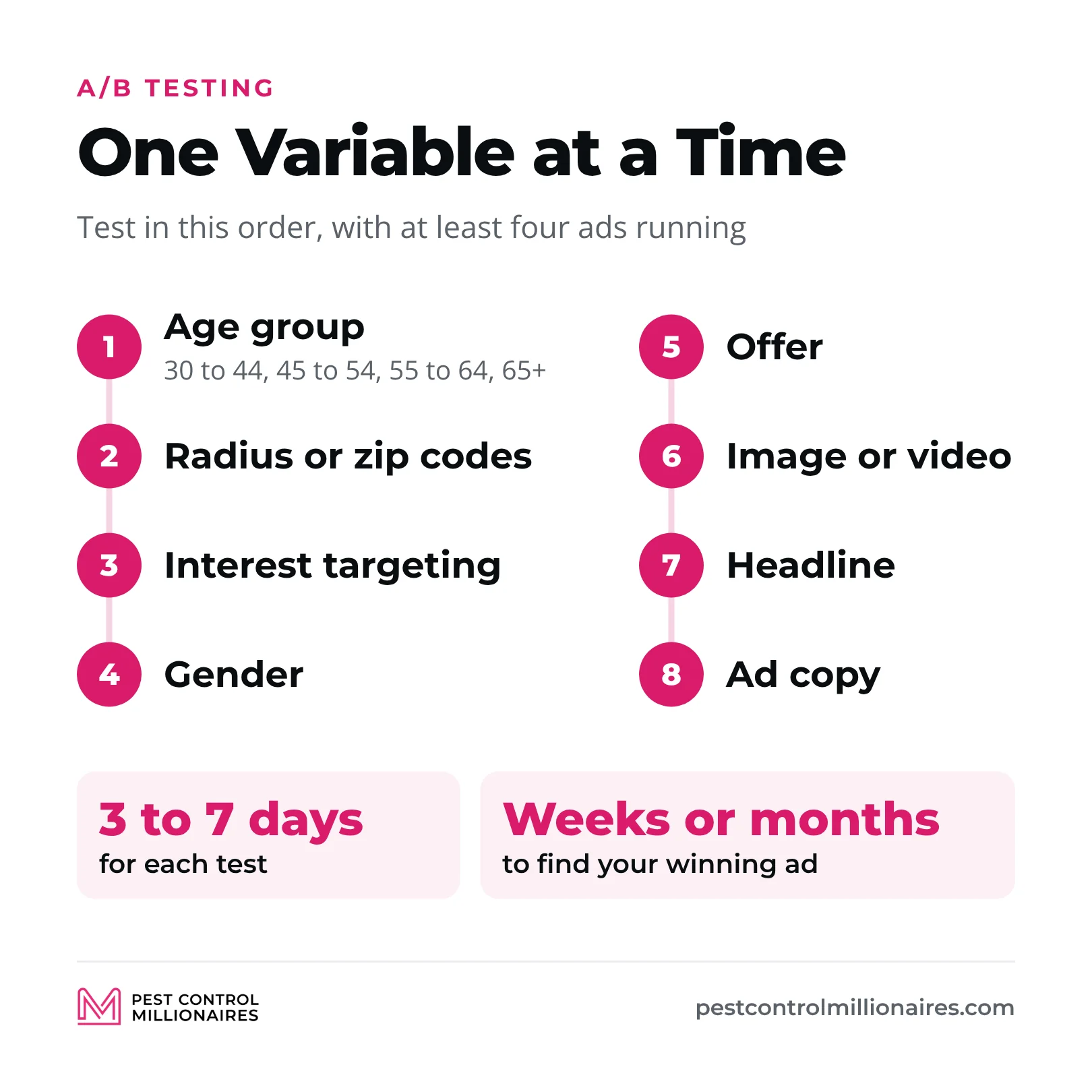
The key to A/B testing is this. Only test one variable at a time. If you change the offer, the image and the headline all at once, you’ll never know which change made the difference.
Here’s the order I recommend.
- Test your age group (30 to 44, 45 to 54, 55 to 64, 65+)
- Test your radius or zip codes
- Test your interest targeting
- Test gender (male vs. female)
- Test your offer
- Test your image or video
- Test your headline
- Test your ad copy
Four ads at a time is my rule. I’m always running at least four variations, testing one variable.
And here’s what’s critical. Let each test run for three to seven days, depending on your budget. Don’t make changes after one day. Give Facebook time to gather data and optimize. The full framework is in A/B split testing Facebook ads for pest control.
What Actually Indicates a Winning Ad
Most people look at cost per lead and think that’s all that matters. Wrong. Cost per acquisition is the metric that actually matters.
Here’s an example. Ad A gets you leads at $10 each. Ad B gets you leads at $30 each. Which one is better?
Everyone picks Ad A because it’s cheaper. But what if Ad A closes at 1% and Ad B closes at 50%? Now Ad A costs you $1,000 per customer, while Ad B costs you $60. Ad B just destroyed Ad A even though its cost per lead was three times higher.
Stop obsessing over cost per lead. Track your customer acquisition cost and which ads turn into paying customers, not just which ads get the most form submissions.
The Testing Timeline Nobody Talks About
Here’s the reality of Facebook ads testing. If you’re starting from scratch, this takes time.
You test age groups (three to seven days). Then radius (three to seven days). Then interest targeting. Then gender, offers, images, headlines and ad copy. Do the math and that’s weeks or even months of testing before you find your winning ad.
That’s why I recommend starting from proven templates and ads that are already working instead of starting from zero. If you insist on building from scratch, just understand that it takes time.
The good news is that once you find a winning ad, you can use it year after year. I’ve been running the same little coupon ad, in white, red and green, for six years. It works every year. I just rotate it in and out as needed.
Once you build a library of winning ads, you’re set. You’ll have ads you know work, ready whenever you need leads.
How to Spy on Your Competitors’ Ads (Legally)
The Meta Ad Library shows every ad your competitors are running on Facebook and Instagram. Search for a competitor’s business name and you can see all their active ads.
This is incredible for research. You can see what offers they’re running, what creative they’re using and what messages they’re testing. It’s like a legal cheat code.
You don’t want to copy their ads. You want to stand out and have a competitive advantage. But it’s extremely valuable to know what your audience is already seeing so you can be different.
If everyone in your market is running $50 off, don’t run $50 off. Stack more value. Bundle services. Build an offer that makes everyone else’s look boring.
Retargeting: The Secret to Converting People Who Didn’t Buy the First Time
Retargeting is where Facebook ads get really powerful, and most pest control companies aren’t using it at all.
Retargeting means showing ads to people who already engaged with your brand but didn’t convert yet. You can retarget people who visited your website but didn’t fill out a form, people who like your Facebook page, people who watched your video and people who started your lead form but didn’t submit it.
These are warm leads. They already showed interest. They just need another push. And here’s what’s amazing. You can make your retargeting ads extremely specific.
Say someone saw your mosquito ad, started filling out the form and didn’t finish. You can retarget them with an ad that says, “Hey, I noticed you didn’t finish filling out your form for mosquito control. What happened? Here’s an extra $20 off if you complete it today.”
It works because people know they almost signed up. They just got distracted or had second thoughts. Now you’re reminding them and sweetening the deal.
You’ve probably seen this yourself with online shopping. You add something to your cart at Nike and don’t check out. Then you see an ad that says, “Hey, you still have items in your cart.” That’s retargeting, and it works. My favorite setups are in Facebook ads retargeting for pest control.
How Far Back to Retarget (My 90-Day Rule)
My rule of thumb is to retarget anyone who engaged with your brand in the last 90 days. In my experience, 90 days is typically the best window.
Meta lets you go back further for some audiences. Website visitors can stay in an audience for up to 180 days, and people who engaged with your Facebook page or Instagram account for up to two years. Lead form audiences stop at 90 days. You’ll need the Meta Pixel on your website to retarget website visitors at all.
I run retargeting ads year-round because there’s always a fresh audience coming through. People see my regular lead ads every day. Some convert, some don’t, and the ones who don’t go into my retargeting pool. Same with website traffic. Some visitors call, some don’t, and the ones who don’t get retargeted on Facebook.
It’s a continuous cycle of new people entering the audience, so you’re not showing the same ad to the same people over and over.
The Biggest Mistakes That Kill Facebook Ad Performance
Let me rapid-fire the biggest mistakes I see.
- Going too broad for too long. Start with a wide radius to test, but narrow down once you find what works.
- Targeting 18 to 29 year olds. Stop wasting money on people who don’t own homes.
- Testing multiple variables at once. You’ll never know what made the difference. Test one thing at a time.
- Not testing at all. This is the biggest one. People create one ad, let it run for two weeks and decide Facebook doesn’t work. Run at least four variations at all times.
- Treating ads like organic content. In your ads, be salesy. It’s an ad. Act like it.
- Putting your phone number in the ad. Let them submit the form so Facebook can track the conversion.
- Calling leads back hours later. Text within 30 seconds and call within five minutes.
- Quitting too early. Give Facebook at least 90 days before you decide it doesn’t work in your market.
- Boosting posts instead of running real ads. Use Ads Manager, not the boost button.
The Real Timeline: When You’ll Actually See Results
Here’s the honest truth about Facebook ads. It takes time. The first month is your learning curve. You’re figuring out the platform, testing offers and finding your audience, and Facebook is learning about your business and who converts.
Month two is when things start clicking. You’ve cut what doesn’t work, you’re doubling down on what does, and your cost per lead is dropping.
Month three is when you have a real system. You know your winning ads and your best audiences, and you’re generating consistent leads.
If you quit in week two because you’re not seeing results, you wasted your money. You never got past the learning phase. Commit to 90 days minimum, test properly and follow the frameworks in this guide.
And if you want to skip the testing and use ads that are already proven, that’s exactly what we teach inside the Pest Control Millionaires program. We give you the exact ads, targeting and offers that are working right now, so you don’t spend months figuring it out yourself.
Whether you build from scratch or use proven templates, Facebook ads absolutely work for pest control companies. You just need to understand that it’s a different game than Google, commit to testing and give it enough time to work. If you want the complete blueprint, it’s in our book, Zip Code Kings.
Frequently Asked Questions
How much should I spend on pest control Facebook ads?
At least $600 a month ($20 a day). Below that, Facebook doesn’t have enough to learn who to show your ads to. Keep four ads running, give the campaign 90 days, and grow the budget from there based on your market and how many leads you can handle.
How much does a pest control Facebook lead cost?
Usually about $10 to $20, a fraction of a Google Search lead, which runs $40 to $90 in most markets. A 20 to 30% close rate is good on Facebook, so judge your ads on cost per customer, not cost per lead.
What images work best for pest control Facebook ads?
Images that show the problem, not your truck. A hand covered in mosquito bites or a family getting swarmed in the backyard, in bright colors that stop the scroll. Before-and-after photos work well too, especially for lawn care. Save the tech-by-the-truck photo for Google, billboards and branding.
How do I write effective pest control Facebook ad copy?
Use five parts. Hook them with the pain or the benefit, explain the offer, stack the value, handle objections and give one clear call to action. You can be as salesy as you want, because people know it’s an ad. Put the offer in the headline, never your company name or phone number, and lead with the hook, since Facebook cuts longer text off behind “See more.”
Should I use video ads for pest control Facebook advertising?
Start with still images. They’re faster to make and easier to swap out, and video only works if you know how to hook people in the first three seconds. The exceptions are customer video testimonials, which crush, and simple clips of a technician on a real job.
What age range should pest control Facebook ads target?
Nobody under 28. Start with women 35 to 55 interested in home and garden, test men in retirement-heavy markets, and test age bands of 30 to 44, 45 to 54, 55 to 64 and 65+. With Advantage+ audience, age is only a suggestion, so use the original audience options to enforce it.
How do I retarget website visitors with pest control Facebook ads?
Install the Meta Pixel on your website, then build a custom audience of visitors who didn’t fill out a form. Meta keeps website visitors for up to 180 days, though my rule of thumb is the last 90. Make the message specific, like “You didn’t finish your form for mosquito control, here’s an extra $20 off.”
How long should I test a pest control Facebook ad?
Run each test for three to seven days, change one variable at a time and keep at least four variations running. Give the whole campaign 90 days before you decide whether Facebook works in your market.
Related Articles