How AI Replaced Our $150,000 a Year Backup Call Center

Table of Contents
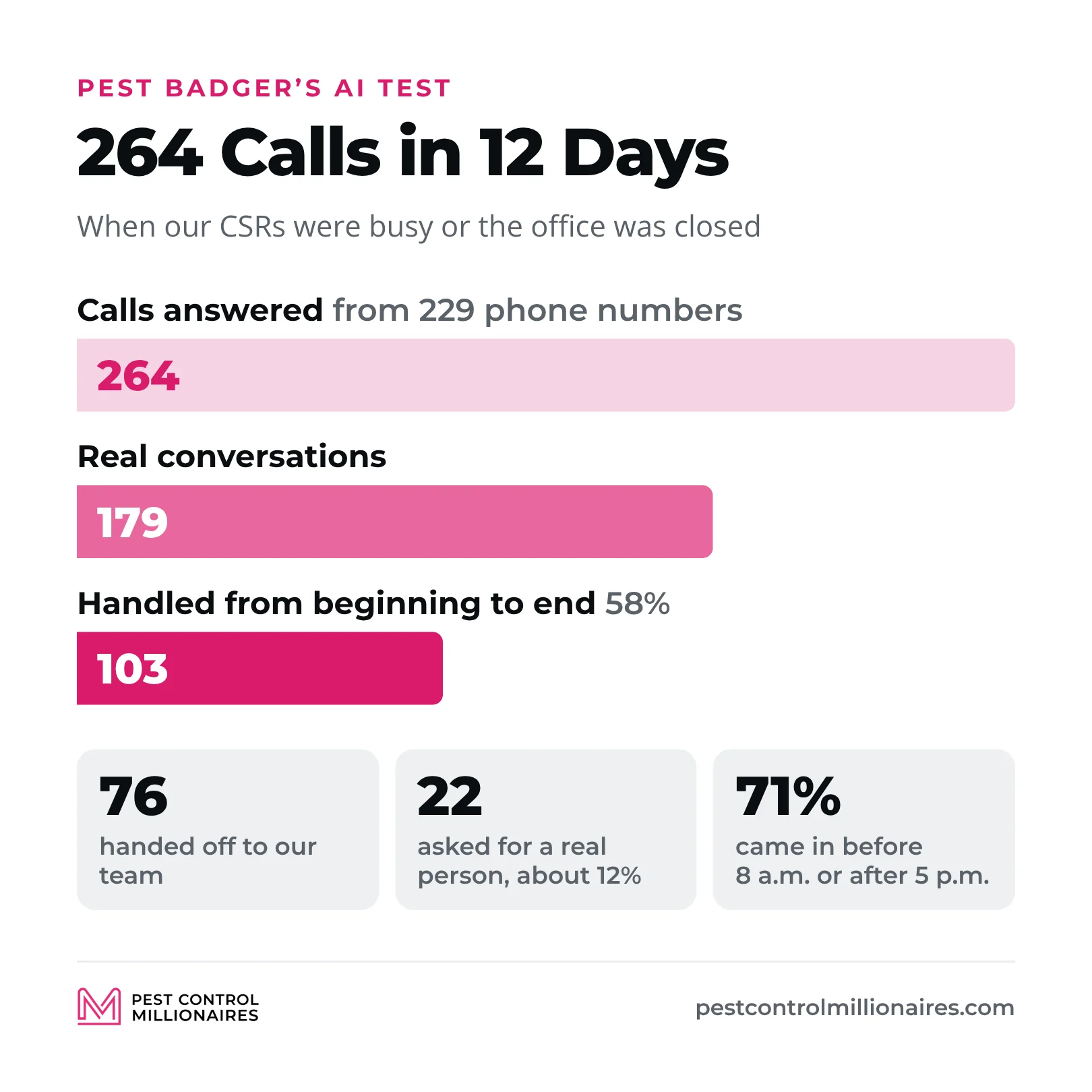
We were spending over $150,000 a year on a backup call center at Pest Badger, so I replaced it with AI. Before anybody loses their mind, I didn’t replace our CSRs. They still answer our phones, and the AI only picks up when all of them are busy or we’re closed. It answered 264 calls in 12 days, and then I went back through all the data to see whether it worked or I was making a huge mistake.
I’ve been in the service industry for 17 years, and we’ve grown Pest Badger from one location to 20 in nine states. These are our numbers from when this video came out in September 2026.
This video is part of PCO Tips. For where AI fits with the rest of your automation, read how to automate a pest control business.
What the AI Answers and What It Doesn’t
AI doesn’t answer any of our sales calls. If someone calls to buy pest control, they go to our sales team. This is only our service line, for existing customers who need to move an appointment, want to know when we’re coming, see the bugs coming back, have a billing question, need to give us a gate code or want to cancel an appointment. Even then, our CSRs get the call first.
Customers always seem to call at the same time, five, six, seven calls back to back, and an outside call center used to take the overflow. To be fair, they did a great job. It’s owned by one of my best friends, and I still think there’s a very good place for a call center. I wasn’t mad at anyone, and I didn’t decide a robot could do better. I was looking at an expense on our balance sheet, roughly $3,000 a week in peak season, and asking a question every owner should ask. Is there a better way of doing this now?
When I tried AI in 2025, it wasn’t there yet. People swore at it, and we pulled the plug. After listening to calls and talking to a lot of people in the industry, it sounded good enough to try again. I didn’t want another demo with the perfect call an AI company picked out. We tested it in the background, then put it on our phones with real customers.
Customers Call When You’re Closed
In 12 days the AI answered 264 calls, about 22 a day, from 229 different phone numbers, all existing customers. The time of day was crazy. We open at 8, and 98 calls came in during the 7 a.m. hour alone. People are getting ready for work. They probably got our text the day before saying we’re coming, so they call before we open to leave a voicemail. 5 p.m., when people are driving home, was our second busiest hour. People called on Saturdays and Sundays. The earliest call came in at 12:34 in the morning and the latest at 9:06 at night.
In all, 111 calls came in before 8 a.m. and 77 after 5 p.m. That’s 71% of the calls outside the 8-to-5 window most call centers work. People work swing shifts and live their lives, and nobody is thinking about your hours. Covering that with people means overtime, and you can’t have unlimited CSRs sitting around waiting for the phone to ring. That’s why we had a backup call center, and it’s why this looked like a good place for AI. I’m not replacing the people who work here every day. I’m covering the gaps around them. It’s the same point Antoni Hoshino made about AI and answering services on the podcast.
Will Customers Talk to It?
Some people won’t say anything, and some just don’t want to talk to a robot. Of the 264 calls, 179 turned into a real conversation. That’s the number I cared about. If something saves me $100,000 and makes a bunch of customers mad, it didn’t save me $100,000. It probably cost me a couple hundred thousand if they cancel.
So I counted how many asked for a real person. Customers can also ask for a call back as soon as an agent opens up. 22 people asked for a person, about 12% of the 179 conversations.
103 Calls Never Needed a Person
The AI handled 103 of those 179 conversations from beginning to end, 58%, without one of our people getting involved. The other 76 went to our team, and I’m not going to hide that number. Most weren’t someone screaming to get the robot off the phone, like the first time we tried it. They were things the AI can’t handle yet, like specific account information, a billing issue or a new credit card, an exact appointment time where we have to move things around, and cancellations, where I want my retention team asking why they signed up and why they’re leaving. I’d rather the AI hand off a call confidently than give a customer the wrong answer.
The audit also shows where the time goes in a service department. We ran it in the middle of August. Scheduling was 38% of the calls where we could tell the reason. Others were wasps, spiders and mouse droppings, 15 reservice calls where the bugs came back, billing questions, two service complaints and one person checking that a door knocker really worked for Pest Badger.
None of that is hard, but somebody has to handle it. When you scale, you think about techs and trucks, not how many more conversations those customers will create. The answer has always been more people, and for the next one, two, maybe five years it probably still will be. I just don’t think it has to be the answer every time anymore.
Better Than a Voicemail
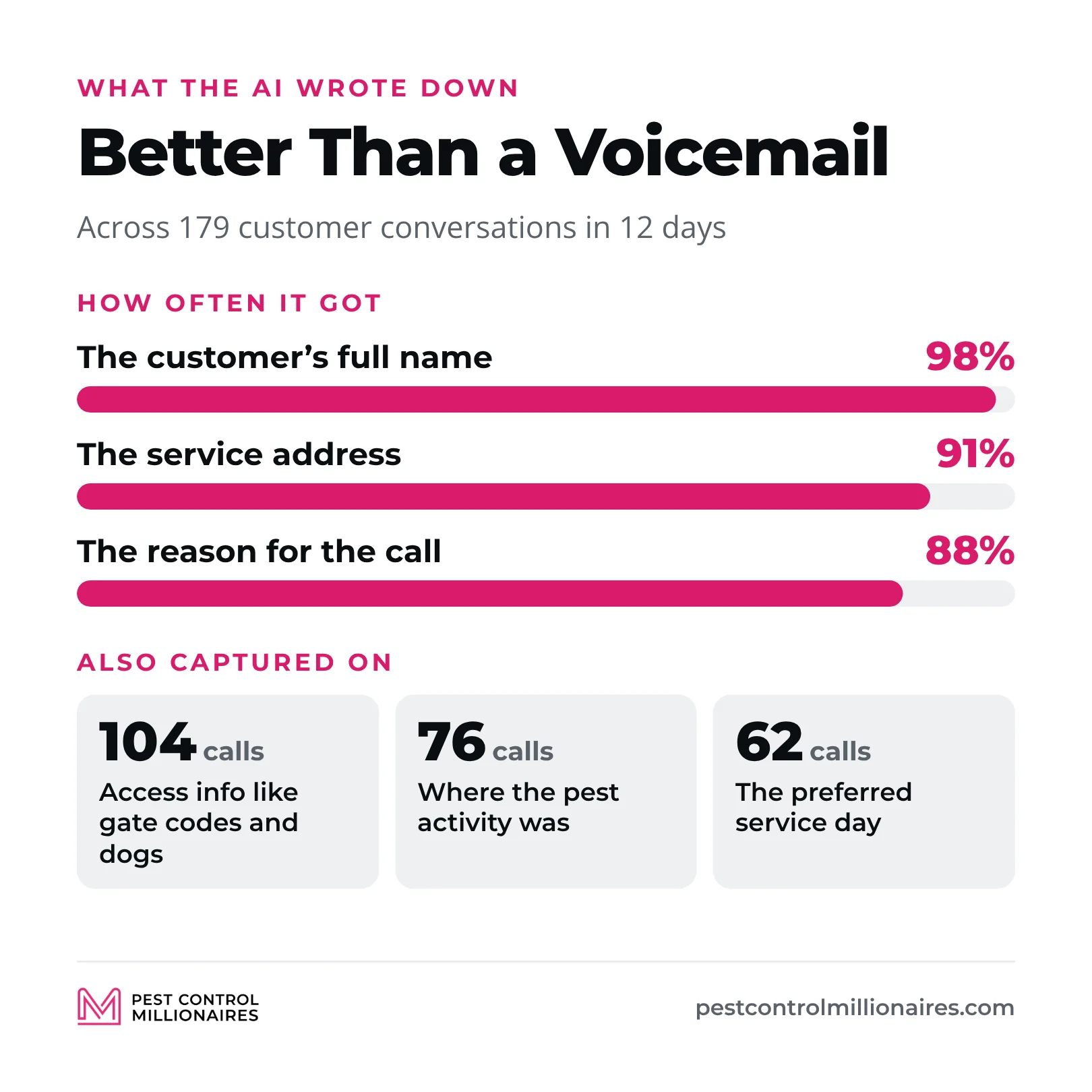
The AI doesn’t just say somebody will call you back. Across the 179 conversations, it got the customer’s full name 98% of the time, the service address 91% of the time and the reason for the call 88% of the time. It collected access information like gate codes and dogs on 104 calls, where the pest activity was on 76 and the preferred service day on 62.
A voicemail gets you “Hey, this is John, I just need somebody to call me back.” A CSR calls John, but he called on his lunch and he’s back at work. He calls back an hour later and we’re busy. That’s phone tag just to find out what John wanted. With the AI, my CSR already knows John has wasps in the garage, wants someone there Thursday or Friday, has a dog in the backyard and here’s the gate code. All we have to do is text him that we got his message.
The AI spent 6 hours and 54 minutes talking to customers in those 12 days, a little over two minutes a call, and the longest was just over five minutes. At about six minutes a call to talk and document it, 179 calls is roughly 18 hours of work. I wouldn’t say we saved 18 hours, because we didn’t measure it that way. But the AI had almost seven hours of conversations our CSRs didn’t have time for, and every one got documented. That doesn’t mean I ask who I can fire. We’re growing, and I need really good CSRs. I just don’t need one spending two minutes taking down a gate code at 7:30 at night.
Keep People on Cancellations and Upset Customers
If a customer is thinking about leaving, I don’t want a robot saying, “Okay, you’re canceled. Have a nice day.” I want to know why. Are they unhappy with our service? Did we not solve their problem? Is it price? Did someone knock their door? That information is how I improve the business.
Same with a customer who’s really upset. We all make mistakes. The AI can collect the information, but sometimes a person just wants to be heard. That’s why 76 conversations still went to our team, and I’m totally okay with that. I’m not trying to get AI to do everything, just to do this better without hurting the customer or our CSRs.
How I’d Start If You’re in the Truck by Yourself
If you’re thinking, “Jonas, that’s great. You got a call center. I’m in my truck by myself,” this matters even more for you. I’ve been that guy. The phone rings while you’re driving, in a crawl space, up on a roof, and every call feels like it needs you, because it kind of does.
So look at everything you do on the phone that doesn’t require you. Keep the sales calls. If you’re the best salesperson in your company because you’re the only one, answer them yourself, or have your call center or a VA answer them or forward them to you. AI can handle an objection, but in my opinion it isn’t good enough for sales yet. Start with existing customers who want to move from Tuesday to Thursday, tell you the gate code changed or need a reservice. Do those calls still need you? Probably not.
Don’t turn everything on the first day. Give the AI one job, listen to the calls, find where it screws up and fix that, then decide whether you trust it with something else. Run it for two weeks and watch it every day. We watched it like a hawk. Watch your CSRs, too. When they know the AI is there, it’s natural for one who isn’t busy to let a call go, and the number one priority is that every customer service call gets answered.
We’re keeping it. I want to run thousands more calls through it, see whether the handoff rate comes down, which I think it will, and see whether our CSRs feel the difference. I’m sure we’ll find things it absolutely sucks at, and that’s why we test. I don’t think AI is going to replace every person in your office. But there are probably hundreds of little things in our business that we always paid a person to do because there wasn’t another option. Now there is. If AI takes the repetitive stuff and gives my people more time to take care of our customers, that’s a trade I’ll make every day.
Frequently Asked Questions
Can AI answer the phone for a pest control company?
For existing customers on the service line, yes. We use it only when our CSRs are busy or the office is closed. In 12 days it answered 264 calls and handled 103 of 179 real conversations from start to finish, and we still keep sales calls, cancellations and upset customers with people.
Do customers mind talking to an AI agent?
Some won’t talk to it, but 179 of 264 calls turned into real conversations, and only 22 people, about 12% of those conversations, asked for a real person. When I tried AI in 2025, people swore at it, and it has gotten a lot better since.
Should AI answer pest control sales calls?
Not yet, in my opinion. If you’re the best salesperson in your company, keep answering those calls yourself or have your call center or VA answer them. Start AI on existing customers who want to reschedule, give you a new gate code or need a reservice.
How do you start using AI for customer service calls?
Give it one job, listen to the calls, find where it screws up and fix that before you trust it with anything else. Run it for two weeks and watch it every day, and watch whether your CSRs start letting calls go to the AI when they’re free.