

Last updated: April 2026 Most pest control companies don’t realize they can improve pest control website conversion rates without spending more on ads. Here’s a question that’ll make you sick to your stomach: how many people visited your website last month and didn’t call you?
Let me paint the picture. You’re spending thousands on Google Ads. You’ve invested in SEO. Maybe you’re running Facebook ads too. Traffic is flowing to your website. 10,000 visitors last month. Impressive, right?
But only 100 of them converted into actual leads. That’s a 1% conversion rate.
Now imagine if you could just tweak a few things on your website and get that conversion rate to 2%. You didn’t spend an extra dollar on ads. You didn’t rank for any new keywords. You just optimized what was already there. Suddenly, you’re getting 200 leads instead of 100. You just doubled your business without increasing your marketing budget.
That’s the power of pest control conversion rate optimization, and it’s the lowest hanging fruit in pest control marketing. Most companies obsess over traffic, rankings, impressions, all these vanity metrics. But they’re completely ignoring the fact that half the people who land on their site bounce within five seconds because the page takes forever to load.
I’ve worked with hundreds of pest control companies, and I see the same mistakes over and over. Long contact forms that ask for 15 pieces of information. No click-to-call button in the corner. Stock images of bugs instead of real photos of their techs. Pages that take 30 seconds to load. No clear offer anywhere on the site.
These companies are bleeding leads and they don’t even know it.
In this guide, I’m going to show you exactly how to optimize every conversion point on your website, your ranking in your service area, and your landing pages. I’ll break down page speed optimization, contact form strategy, trust signals that actually work, and the tracking systems you need to know what’s converting and what’s not.
This isn’t theory. Conversion rate optimization for pest control companies is our specialty, and these are the exact strategies we use with our clients to 2x their conversion rates without spending another dollar on traffic.
Let’s start with why this matters so much. Conversion rate optimization amplifies every other part of our pest control marketing playbook, so the more you fix the funnel, the more every ad dollar returns.
Table of Contents
ToggleWhy Conversion Rate Optimization Is the Lowest Hanging Fruit in Marketing
Think about your marketing funnel. You’ve got traffic coming from SEO, Google Ads, Facebook ads, Local Services Ads, all these different sources. That traffic is expensive. You’re paying for it either with ad spend or with the time and money you invested in SEO.
But once that traffic hits your website, conversion is essentially free. You already paid to get them there. Now it’s just a matter of whether your site is optimized enough to turn that visitor into a lead.
Here’s a real example. Let’s say your termite control Chicago page gets 100 visitors per month from organic SEO. Right now, two of them convert. That’s a 2% conversion rate.
If you optimize that page and get the conversion rate to 4%, you just went from two customers to four customers. You doubled your revenue from that page without doing anything to your SEO. You didn’t build more building backlinks. You didn’t write more content. You didn’t rank for new keywords. You just made the page convert better.
Now scale that across your entire website. If you have 10,000 monthly visitors and a 1% conversion rate, you’re getting 100 leads. Bump that to 2%, now you’re getting 200 leads. That’s a 2x increase in your business from optimization work you can do in an afternoon.
This is why I’m so passionate about conversion rate optimization. It’s the fastest, cheapest way to grow your business if you’re already getting traffic.
The Two Main Ways People Convert (And Why Most Sites Mess Up Both)
There are two primary conversion points on any pest control website: phone calls and contact form submissions.
Phone calls are your highest-converting option. Someone lands on your site, sees your number, clicks it, and calls you right there. If you answer the phone, you can close them immediately. This is bottom-of-funnel, ready-to-buy traffic.
Contact forms are your backup. Some people don’t want to call. Maybe they’re at work. Maybe they’re introverts. Maybe they just prefer filling out a form and having you call them. Either way, you need both options.
Here’s where most pest control companies screw this up: they make it way too hard to do either one.
I see sites all the time where you have to scroll to the bottom of the page to find the phone number. Or worse, you have to click through to a separate contact page just to submit a form. That’s insane. You’re adding friction at every step.
Think about it like Amazon. Amazon revolutionized online shopping by making it frictionless. One-click purchase. Your payment info is already saved. Your address is already there. You click one button and your order is placed. They removed every possible barrier between “I want this” and “I bought this.”
Your website needs to work the same way. Remove every possible barrier between “I have a pest problem” and “I just contacted this company.”
The Click-to-Call Button Strategy (Why Sticky Headers Matter)
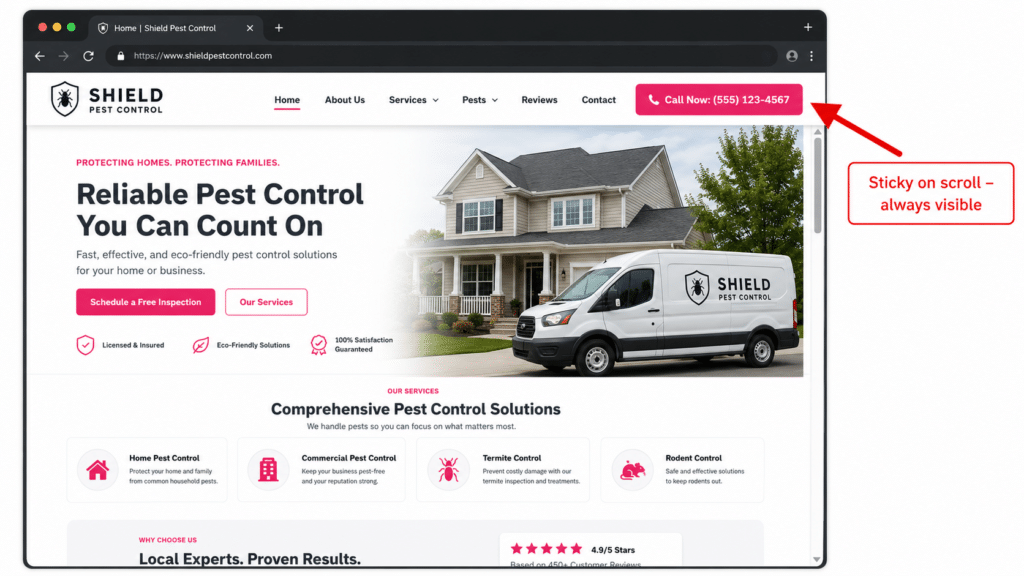
Every pest control website needs a click-to-call button in the top right corner of the header. This is non-negotiable.
But here’s the key: that header needs to be sticky. What does that mean? It means when someone scrolls down the page, the header stays at the top. It doesn’t disappear.
Some website themes don’t have this feature by default. You might have to pay extra. You might have to switch themes. Do it anyway. This one change can dramatically increase your conversion rate.
Why? Because people scroll. They’re reading your content, looking at your services, checking out your reviews. The whole time they’re scrolling, that click-to-call button is sitting right there in their peripheral vision. Bright color, impossible to miss. Subconsciously, it’s screaming “touch me, call me, click the button.”
Make sure that button is actually click-to-call, not just text with your phone number. On mobile, when someone taps that button, it should immediately dial your number. No copying and pasting. No switching to the phone app manually. One tap, call connected.
And use a color that stands out. Don’t make it the same color as your brand if your brand colors are muted. Use bright pink, neon green, electric blue, something that pops off the screen. This is your call-to-action. It needs to grab attention.
Contact Forms: How Simple Is Too Simple?
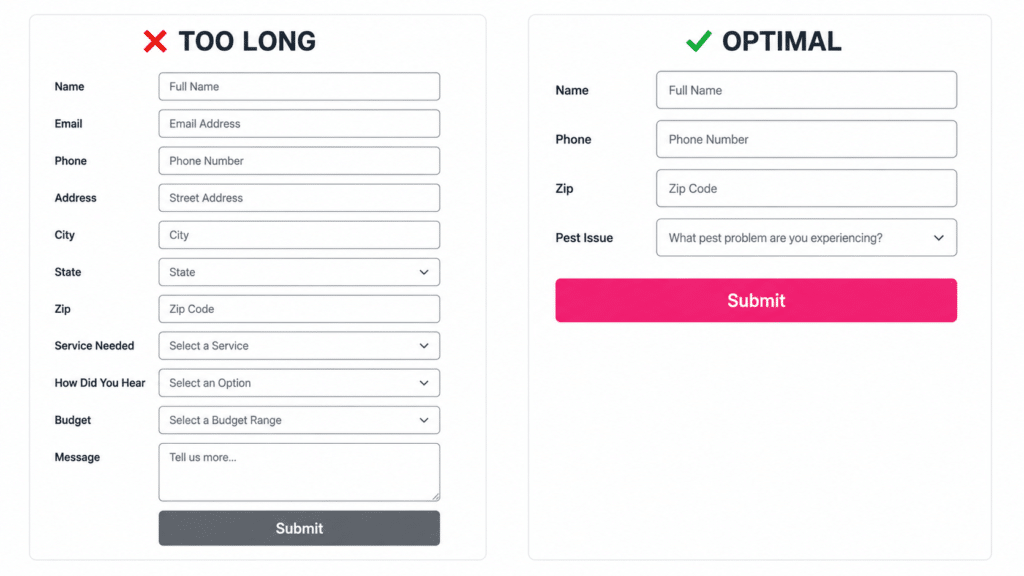
Contact forms are tricky because there’s a balance between collecting enough information to qualify the lead and keeping the form short enough that people actually fill it out.
Here’s the principle: every field you add to your contact form is another brick in the wall. You’re making it harder for people to convert.
I talked to Aaron Weiche about this. He runs LeadFerno and is one of the top people in conversion rate optimization for local SEO for pest control companies. He said every single section you add to a contact form increases friction. You can keep asking for more information, but understand that you’re going to lose people at every step.
So what’s the right balance?
If you want maximum volume, keep it super simple: name, phone number, email, zip code. That’s it. Four fields. Takes 30 seconds to fill out. You’ll get tons of leads.
If you want higher quality leads and you’re willing to sacrifice volume, add more fields. Ask about their specific pest issue. Ask when they need service. Ask about the size of their property. You’ll get fewer leads, but the ones you get will be more qualified.
Most pest control companies should lean toward simpler forms. Get the lead, then qualify them on the phone. Don’t try to pre-qualify everyone with a 15-field contact form.
And here’s critical: put a contact form on every landing page. Don’t make people go to a separate contact page. If they land on your termite control Chicago page, there should be a form right there on that page. Ideally in the second section, right below the hero section.
Why? Because page speed. If someone has to click through to your contact page and that page takes 10 seconds to load, you just lost them. They already waited for your first page to load. They’re not waiting for a second page.
Make it frictionless. Let them contact you on whatever page they land on.
Live Chat: The Conversion Tool You're Probably Not Using
Live chat is rapidly rising as a third conversion point, and every pest control company should have it on their site.
Think about it: different people want to contact you in different ways. Some people want to call. Some people want to fill out a form. Some people want to text or live chat. Why wouldn’t you accommodate all of them?
There are tons of chat widget options. Podium, LeadFerno, even free WordPress plugins. Pick one and install it.
Here’s what’s cool about LeadFerno specifically: instead of keeping the conversation in a website chat window, it immediately converts to a text message conversation. Now you’re texting back and forth with the prospect, which is way more personal and immediate than email.
Texting is the main platform people prefer now. Email gets ignored, goes to spam, gets lost. But texts? People read every text. A text feels important.
And here’s something most people don’t realize: live chat is about to become even bigger. In the next year or two, people will be sending AI agents to your website. Their AI will talk to your chatbot, and they’ll book an appointment without any human interaction. It sounds crazy, but it’s coming fast.
Get ahead of it. Install a chat widget now.
Why Your Page Speed Is Killing Your Conversions (And How to Fix It)
Page speed is one of the biggest conversion killers, and most pest control companies have no idea their site is slow.
Here’s the reality: people have the attention span of a goldfish. Actually worse than a goldfish. Goldfish have an eight-second attention span. People have a seven-second attention span, and it’s getting shorter.
If your page takes 10 or 20 seconds to load, nobody is waiting. They’re clicking back to Google and calling your competitor.
Back in the day, maybe people would wait a minute for a page to load. That was just expected. But now? Everything is instant. Instagram loads immediately. Twitter loads immediately. People are used to speed. Anything slower than three seconds feels like an eternity.
So if your page is slow, it doesn’t matter how good your SEO is. It doesn’t matter how much traffic you’re driving. Your funnel is clogged. Nothing is getting through to the bottom because people are bouncing before the page even loads.
Use Google’s PageSpeed Insights tool to check your speed. Just search “PageSpeed Insights,” plug in your URL, and it’ll tell you how fast your page loads and what’s slowing it down.
The Three Hosting Components You Need for Fast Page Speed
If you’re serious about page speed, you need three things: WP Engine, WordPress, and Cloudflare. These are basically industry standard, not just for pest control but for websites in general. Every major site uses some version of this stack.
WP Engine is your hosting provider. You don’t need the expensive plan. The standard $25/month plan is fine for most pest control companies.
WordPress is your website builder. It’s free to use, though you’ll probably need to pay for some plugins. But WordPress itself doesn’t cost anything beyond the hosting.
Cloudflare is your content delivery network and security layer. There’s a free plan that’s solid, but I recommend the $20/month plan for better security and stability.
That’s it. WP Engine, WordPress, Cloudflare. This setup will give you fast, secure, reliable page speed.
Could you use other platforms? Sure. Some people build on GoHighLevel or Framer and swear it’s better. But WordPress is the most proven, the most SEO-friendly, and the most widely supported platform in the world. Half the internet runs on WordPress. Stick with what works.
The Image Compression Mistake That's Slowing Down Your Site
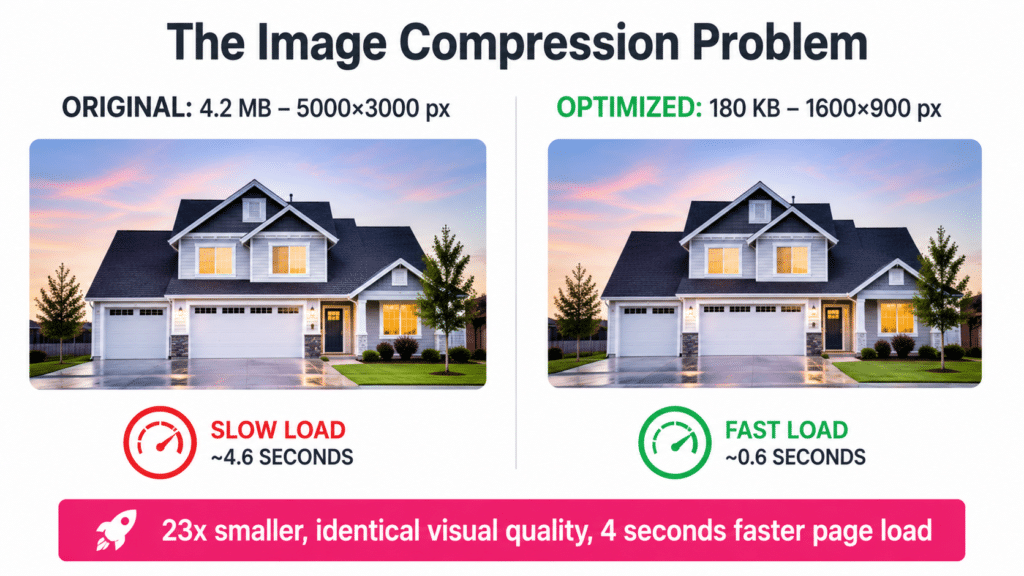
The single biggest thing slowing down most pest control websites is huge, uncompressed images.
Here’s what happens: you take photos with a professional camera or even a good smartphone. Those images are high quality, which means they’re massive files. The dimensions might be 5000×3000 pixels. That’s way bigger than you need for web.
When you upload that image to your website, it looks fine to you. It displays correctly. But in Google’s eyes, that image is a monster. It’s slowing down your entire page.
You need to compress those images. The photo might need to be 500×300 instead of 5000×3000. You’ll lose a tiny bit of quality, but it’s barely noticeable. And you’ll gain massive page speed improvements.
Use an image optimization plugin on WordPress. There are tons of them. Image Optimizer Pro is one. Just search “image optimizer” in the WordPress plugin directory and pick one.
Set it up once, and it’ll automatically compress every image you upload going forward. Problem solved.
The Plugin Overload Problem (And How to Audit Your Site)
Another common issue: too many plugins slowing down your site.
WordPress is amazing because you can add functionality with plugins. Need a contact form? Install a plugin. Need SEO optimization? Install a plugin. Need image compression? Install a plugin.
But here’s the problem: some companies have 50+ plugins installed because they’ve worked with five different agencies, and each agency installed their own set of tools. Now your site is crawling.
Every plugin adds JavaScript to your site. Too much JavaScript slows everything down. Google PageSpeed Insights will tell you if this is your problem.
The solution: audit your plugins. Go through the list and delete anything you’re not actively using. Be careful though, because removing the wrong plugin can break your site. If you’re not technical, hire someone who knows what they’re doing.
As a general rule, keep your plugin count reasonable. You don’t need 50 plugins. Most sites can run well with 15 to 20.
How Often You Should Check Your Page Speed
Optimize your page speed immediately if you know it’s a problem. That’s obvious.
After that, check it at least once a month. But more importantly, check it whenever you make big changes to your top-performing pages.
Let’s say your pest control Chicago page is one of your top SEO pages, generating tons of leads. You should be checking that page more often than some random blog post that gets zero traffic.
Apply the 80/20 rule here. Twenty percent of your pages probably generate 80% of your results. Focus on those pages. If you keep those optimized and fast, you can assume the rest of your site is probably fine too, especially if they all use the same template.
Your homepage should be checked pretty often, maybe once a week, especially if you’re making changes. But for your service and location pages, monthly is fine unless you’re doing major updates.
The Animation Trap (Why Your Cool Design Is Costing You Leads)
Here’s an easy fix most people miss: remove animations from your pages.
I see this all the time. People add animations to their headings, their images, their text, everything. It looks cool and modern. There’s an animation for the heading fading in, the image sliding in, the text appearing one letter at a time.
But every animation adds to your page load time. And when you stack 10 animations on one page, it adds up fast.
I’m not saying animations are evil. But for conversion-focused landing pages, they’re not worth the trade-off. Speed beats aesthetics every time.
Save the fancy animations for brand awareness pages or your portfolio. Your money pages, the ones generating leads, should load instantly with minimal animations.
Google Business Profile Optimization: The Easy Wins Everyone Ignores
Your Google Business Profile is way simpler to optimize than your website, but somehow most companies still get it wrong.
Think about it: there’s not much you can do on a Google Business Profile. You can add photos, post updates, respond to reviews, add products, fill out your description. That’s basically it. It’s not complex like a website with 100 pages and technical SEO and schema markup and all that.
And yet, I look at pest control Google Business Profiles all the time, and there’s always something missing. Always something that could be better.
This is low-hanging fruit. You could optimize your entire Google Business Profile in one afternoon and immediately start converting better.
Google Posts: Your Free Billboard That Nobody Uses
Google Business Profile posts, also called GBP posts or Google updates, are free advertising space. Treat them like a mini billboard.
When someone lands on your profile, they see your posts right there. This is your chance to hit them with your best offers, your top testimonials, your most compelling services.
I talked to Darren Shaw about this. He’s arguably the number one person in local SEO, and he said don’t treat Google posts like social media. Don’t try to provide value or share helpful tips. That’s not what converts.
Instead, use them for pure advertising. “$50 off your first service.” “Free termite inspection.” “Mosquito control included free with annual plan.”
Put all your offers in your Google posts. Rotate them regularly. Keep them fresh. This is free advertising that most of your competitors aren’t using effectively.
Products on Google Business Profile (Why You Should Use Them Even Though Nobody Sees Them)
Google lets home service companies add products to their Business Profile. Most people have no idea this feature exists. Even fewer people actually use it.
I’m honestly surprised Google hasn’t removed this feature yet for service businesses, but they keep it around. So we might as well use it.
Products are one of the last things people see on your profile, way down the page. But here’s why you should still add them: it’s part of the game of competition.
If your competitor has 20 products listed and you have zero, even that tiny difference can tip someone toward them. You want to do more than your competition, especially on easy stuff like this.
Add your top services as products: termite control, mosquito control, bed bug control, rodent control, general pest control. Link each product to the corresponding service page on your website.
Go one step further: make them location-specific. Instead of “Termite Control,” make it “Termite Control Chicago” and link it to your termite control Chicago page. This establishes even more connection between your Google Business Profile and your website, and it reinforces local relevance.
Photos and Videos: Why Technicians Smiling Beats Everything
Photos are critical on your Google Business Profile, and most companies do this completely wrong. The formula is simple: technician smiling, doing something.
That’s it. Technician smiling in the van. Technician smiling while spraying. Technician smiling in an attic. Technician smiling with a customer.
People connect with people. Especially for a service business like pest control where you’re going into someone’s home, they want to see who’s actually coming to their house. Is this person trustworthy? Do they seem nice? Do they seem professional?
You can’t convey that with a stock photo of a bug or a generic picture of a truck. You need real people doing real work.
I recommend at least 50 photos and at least five videos on each Google Business Profile. That sounds like a lot, but you can knock out 50 photos in an hour or two. Just follow a tech around for a day and take pictures of everything they do.
Videos are even more powerful. Almost nobody is doing video on their Google Business Profiles, which means if you do it, you automatically stand out.
The videos don’t need to be professional. Just authentic. Follow a tech doing a service. Show a time-lapse of a treatment. Show a before-and-after of a lawn treatment. Show a tech finding termites in a crawl space.
These videos build trust in a way that static text never could. And the best part: you should already be creating this content for YouTube and social media anyway. Repurpose it for your Google Business Profile. Great content gets distributed everywhere.
Review Replies: The Conversion Factor Nobody Thinks About
Reviews are obviously huge for conversions. If you have 500 reviews at 4.8 stars and your competitor has 50 reviews at 4.2 stars, you’re winning.
But what most people don’t think about is review replies. Responding to reviews isn’t just about ranking (although it does help with that too). It’s about conversion.
Prospects are looking at how you interact with your customers. If someone leaves a five-star review and you ignore it, that’s a missed opportunity. If someone leaves a one-star review and you respond professionally, that actually builds trust.
Here’s a crazy story. I had a local SEO expert on my podcast who’s worked on major projects for big companies and even helped the FTC with review policy. He told me about a restaurant that got swarmed with fake one-star reviews from some paid spam campaign.
Instead of trying to remove the reviews professionally, the owner lost his mind. He replied to two of them saying “I hope you die in a car accident” and “I hope you crash your car and die.”
Obviously, don’t do that. No matter how angry you are, no matter how unfair the review is, don’t lose your cool publicly.
When you get a five-star review, take 60 seconds to write a thoughtful response. Thank them by name. Mention something specific from their review. Show genuine gratitude.
When you get a one-star review, stay calm. Acknowledge their frustration. Apologize. Offer to make it right. This shows future customers how you handle problems, which is actually more important than never having problems at all.
Nobody expects perfection. They expect you to handle issues professionally when they arise.
Why One-Star Reviews Aren't the End of the World
People panic about one-star reviews. They think it’s going to destroy their business. They desperately try to get it removed.
Relax. One bad review is not the end of the world.
In fact, having a perfect 5.0 rating with only 10 reviews looks fake. People trust a 4.5 to 4.9 rating with hundreds of reviews way more than a perfect 5.0 with barely any reviews. They know no business is perfect.
Think about Amazon. Would you rather buy a product with 15,000 reviews and a 4.5 rating, or a product with 10 reviews and a 5.0 rating? Obviously the one with 15,000 reviews. Volume matters more than perfection.
So stop stressing about individual bad reviews. Focus on collecting tons of positive reviews to drown them out.
Landing Page Structure: The Hero Section That Converts
Now let’s talk about individual landing pages on your website. These are your money pages: termite control Chicago, pest control Phoenix, mosquito control Miami, whatever.
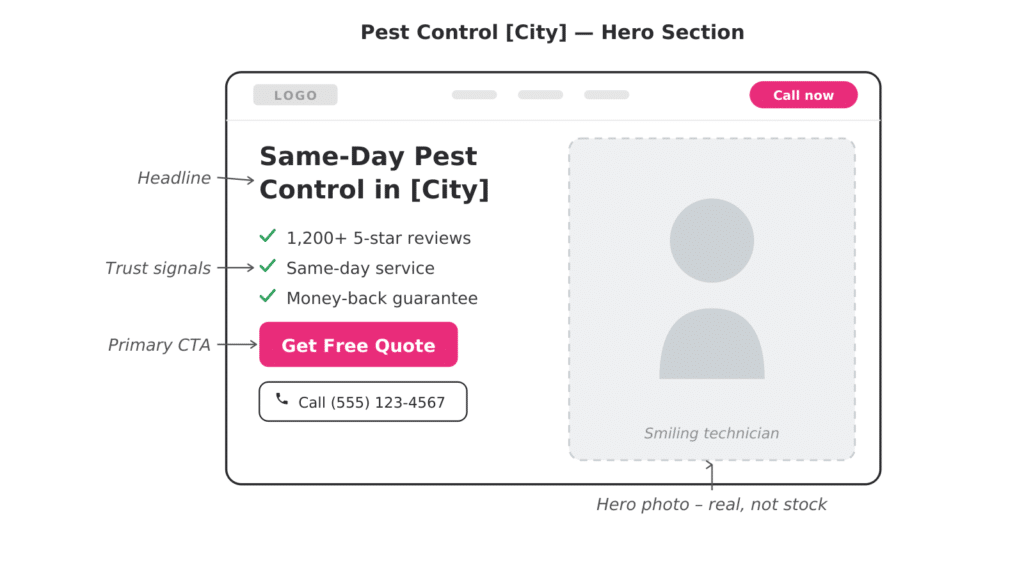
The first section of every landing page is your hero section, and it needs to do three things: grab attention, build trust, and push for conversion.
On the right side, use a hero image. This should be a great photo of a technician, ideally smiling and doing something. Not a stock photo. Not an AI-generated image. A real photo of a real person on your team.
On the left side, you have your headline. This should call out the market immediately. “Are you looking for termite control in Chicago?”
They just clicked on this page from Google or from an ad. Yeah, they’re looking for termite control in Chicago. You just confirmed they’re in the right place.
Below that, add a short description that builds trust. “You landed in the right place. Green Day Pest Control has been serving the Chicago area for 10 years. We’re locally owned and operated, and we love serving our community.”
Then finish with a clear call to action. “If you’re ready to get rid of your pests today, click the button below to call us now.”
Then have a big, bright, impossible-to-miss call button right there. This should be the first thing people see when they land on the page.
I prefer a call button in the hero section instead of a contact form. Save the contact form for the second section. Give them the call button first because that’s the highest-converting action.
Why Your Landing Pages Need Multiple Calls to Action
One of the biggest mistakes I see: contact form at the bottom of the page, and that’s it.
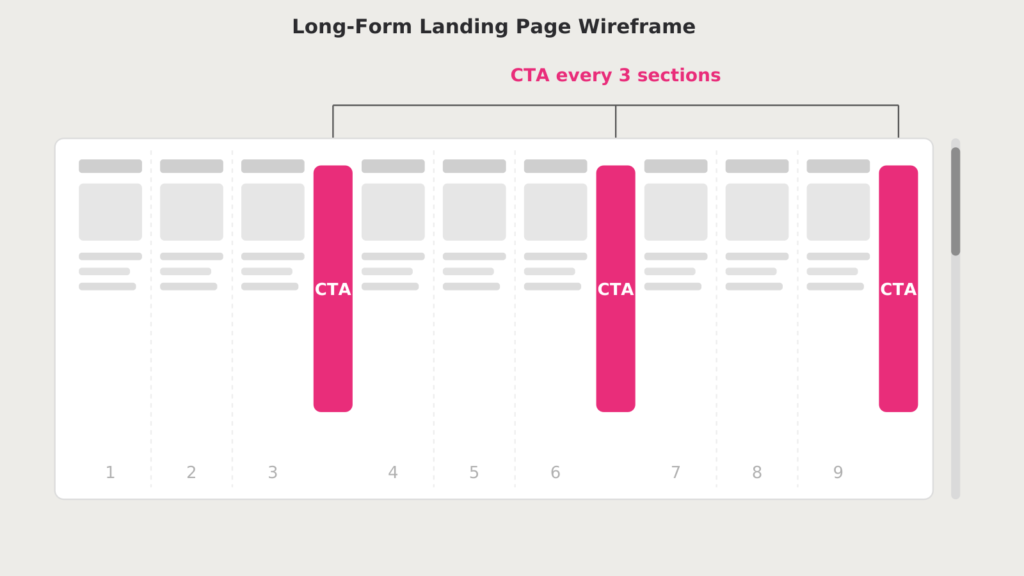
Why would you make people scroll through your entire page before they can convert? Some people are ready to call you immediately. Don’t make them hunt for the button. Here’s the rule: call people to action every three sections.
First section: call button. Maybe it’s a big photo with a call button.
Next three sections: maybe you’re explaining your process, talking about the most common pests in the area, showing some customer testimonials.
After those three sections: another contact form or another call button. Give them another chance to convert.
Keep going through the page. Every three sections, call them to action again.
Why? Because different people consume content differently. Some people see the first section, they’re sold, they convert immediately. Great.
Other people want more information. They scroll through, read about your process, look at your reviews, learn about the pests you treat. After consuming all that information, now they’re ready to convert. Make sure there’s a form or a button right there when they’re ready.
And here’s critical: end the page with your strongest call to action. If someone scrolled all the way to the bottom, they are a warm lead. They went through your entire page. They’re interested. Don’t lose them at the finish line.
Maybe you give them a better offer. Maybe you use all caps. Maybe you add some visual flair. Whatever it takes, do not let them leave your page without converting.
The Duplicate Content Trap (Why Every Location Page Needs to Be Unique)
Here’s a huge mistake I see constantly: companies build out location pages for every city they serve, but all the pages are identical except for the city name.
Pest control Chicago. Pest control Naperville. Pest control Aurora. Same content, same images, same structure. Just swap out the city name.
This is terrible for SEO and terrible for conversions. For SEO, Google sees this as duplicate content. They’re not going to rank all those pages. They might rank one, or they might rank none of them.
For conversions, it feels fake. If someone lands on your Naperville page and it’s exactly the same as your Chicago page, they notice. It feels generic. It feels like you don’t actually care about their specific area.
Make each location page unique. Talk about the most common pests in that specific city. Share a story about a job you did in that neighborhood. Mention the suburbs you serve within that area. Use unique photos from jobs in that city.
This makes it more relevant to the search, which increases both ranking and conversion. People want to hire a company that knows their area, not a company that copy-pasted the same content across 50 pages.
Trust Signals: Reviews Widgets That Actually Work
Reviews are your strongest trust signal on landing pages. If you have great reviews, plaster them everywhere.
Use a reviews widget that pulls from your Google Business Profile and displays them on your website. There are tons of WordPress plugins for this. Google Reviews Widget is one. Just search for it and install it.
Put the reviews widget near the bottom of the first section or at the top of the second section. You want people to see it early, but not before they see your call to action.
The widget should scroll automatically so people can see review after review coming through. It builds trust without taking up a ton of space on the page.
And use your highest-reviewed Google Business Profile. If your main location has 500 reviews and your other locations have 20, use the one with 500. You want the biggest number possible.
Customer Testimonials: How to Do Them Without Looking Fake
A lot of companies use customer testimonials wrong. They take text from a review, then slap a stock photo next to it and call it a testimonial.
Don’t do that. People can tell it’s fake.
If you want to use photo testimonials, use real photos. The best option: a selfie of your tech with the customer. It’s clearly real, it shows your actual team, and it connects the testimonial to a face.
Even better: video testimonials. Get a 30 to 60 second video of a customer talking about their experience. This is infinitely more powerful than text.
The easiest way to get video testimonials is to make it feel like a conversation, not a scripted testimonial. Have your tech talk to the customer on camera. “Hey Sally, tell me about your experience today.”
Make it natural. Most people aren’t comfortable on camera, so the interview format makes it way easier. They’re just having a conversation with your tech, not staring into a camera trying to remember their lines.
This is authentic, it builds massive trust, and it’s content you can repurpose everywhere: your website, your Google Business Profile, Facebook, YouTube, everywhere.
Want the full playbook in one place?
Everything we’ve learned building multi-location pest control companies is in Zip Code Kings — the book we wish existed when we started.
Why You Should Never Use Stock Photos on Landing Pages
Stock photos kill trust. People can tell they’re fake, and it makes your company seem fake.
Even a mediocre photo from your iPhone is better than a polished stock photo because it’s real. Pest control isn’t sexy. It’s not glamorous. So don’t try to make it look glamorous with stock imagery.
Show your real techs doing real work. Show real customers in real houses. Show the reality of what you do.
We’re in a trust recession right now. With AI making it easier than ever to fake content, people crave authenticity more than ever. Give them real.
The Tracking Setup You Need to Know What's Actually Working
You can’t optimize what you don’t measure. If you’re not tracking conversions, you have no idea what’s working and what’s not.
The foundation of tracking is Google Analytics. This is non-negotiable. If you don’t have Google Analytics set up on your website, stop reading this and go set it up right now.
Google Analytics tracks everything: how many people visit your site, which pages they visit, how long they stay, where they came from, what they do on your site, all of it.
Once you have Google Analytics running, you can set up conversion events (also called key events). These track specific actions you care about: someone clicking the call button, someone filling out a contact form, someone spending more than two minutes on a page, whatever matters to you.
You can set up as many conversion events as you want. Track different call-to-action buttons. Track different forms. Get as detailed as you need.
Call Tracking: Why You Need Different Numbers for Every Source
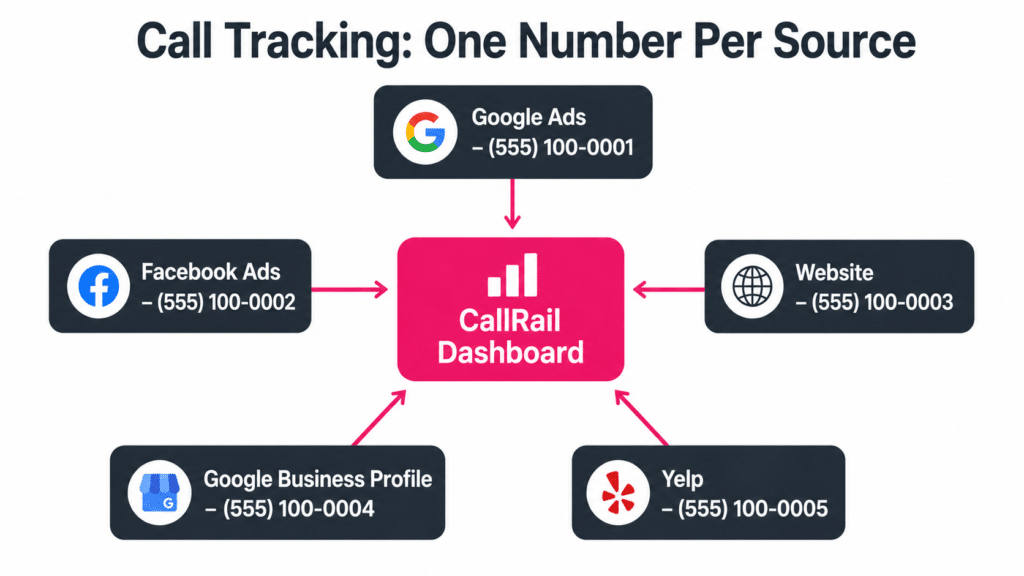
Google Analytics tells you what’s happening on your website. But you also need call tracking to know which marketing channels are actually generating phone calls.
Use CallRail or GoHighLevel or whatever platform you prefer. The key is: assign a unique phone number to every lead source.
Google Ads campaign one gets its own number. Google Ads campaign two gets its own number. Each Google Business Profile gets its own number. Your website gets its own number. Facebook ads get their own number.
Why? So you can see exactly where your leads are coming from.
If you’re spending the same amount on two different campaigns but one is generating 20 calls and the other is generating zero, you need to know that. Shift your budget accordingly.
Too many companies use the same phone number across everything. They have no idea which marketing channel is actually working. They’re flying blind, wasting money on channels that aren’t producing.
The Metrics That Actually Matter (And the Vanity Metrics You Should Ignore)
Most pest control companies obsess over the wrong metrics.
They care about traffic. “My site got 10,000 visitors last month!” Okay, cool. How many leads did you get?
They care about rankings. “I’m ranking number one for pest control Chicago!” Awesome. How many customers did that generate?
They care about impressions. “My Google Business Profile got 50,000 impressions!” Great. How many people actually called you?
Stop focusing on vanity metrics. Focus on leads and customers.
Traffic is cool, I guess. It’s nice to know your site is getting visitors. But if none of them convert, who cares? The goal isn’t traffic. The goal is customers.
Work backwards from what actually matters. Customers come from leads. Leads come from conversions. Conversions come from optimized pages with good offers and clear calls to action.
If you’re not getting leads, it doesn’t matter how much traffic you have.
Average Time on Page: The Metric That Predicts Everything
One metric I pay close attention to is average time on page. This tells you if people are actually engaging with your content or if they’re bouncing immediately.
You want people spending at least 30 seconds on your pages. If your average time on page is five or 10 seconds, that’s a problem. People are landing on your site and clicking off immediately.
This could be a page speed issue. It could be a relevance issue. It could be a design issue. But whatever it is, you need to fix it.
Here’s what most people don’t realize: conversions tie into SEO. Let’s say you’re ranking number one for a great keyword. You’re generating tons of traffic. But everyone bounces after five seconds because your page is slow or irrelevant or ugly.
Google sees that behavior. They see everyone clicking off your page and going back to the search results. That’s a terrible signal.
Even though you did all this SEO work to rank number one, Google is going to drop you down because they don’t want to show a page that nobody likes.
You can’t separate conversion optimization from SEO. They’re inseparable. If people don’t engage with your page, you won’t maintain your rankings.
The Audit Process: How to Find What's Broken
If you’re taking over a new site or you haven’t looked at your conversion tracking in a while, here’s how to audit it.
Start at the bottom and work your way up. Look at CallRail or whatever call tracking you have. How many calls are you getting? Are you tracking the sources properly? Do you have unique numbers for each lead source?
Then go into Google Analytics. Do you even have conversion events set up? If not, set them up first. If yes, look at the data. Which pages are converting? Which pages are getting traffic but zero conversions?
Spend an afternoon just poking around in Google Analytics. Be curious. Look for patterns. “Huh, we got way more leads in March than February. I wonder why?” “This one page is getting tons of traffic but nobody’s converting. What’s wrong with it?”
Most of the time, the problem isn’t even that you need to optimize. The problem is that tracking isn’t set up correctly in the first place. You can’t audit what you’re not measuring.
Why Most Companies Can't Answer Basic Questions About Their Website
I ask pest control owners basic questions all the time, and most of them can’t answer.
“What’s your conversion rate?” Don’t know.
“Which pages generate the most leads?” Not sure.
“How many people filled out a form last month?” No idea.
“What’s your average time on page?” Never checked.
These are fundamental metrics that every business owner should know. But most don’t have the systems in place to track them.
That’s the first step. Not optimization, but measurement. You need to know what’s happening before you can fix what’s broken.
Set up Google Analytics. Set up call tracking. Set up conversion events. Track everything.
Then optimize based on what the data tells you.
The Quick Wins You Can Implement This Afternoon
If you only do a few things after reading this guide, do these:
Add a sticky click-to-call button in the top right corner of your website. Make it bright, make it impossible to miss.
Shorten your contact forms. Remove every field that isn’t absolutely necessary. Name, phone, email, zip code. That’s it.
Add contact forms to your landing pages. Don’t make people go to a separate contact page. Let them convert on whatever page they land on.
Check your page speed with Google PageSpeed Insights. If it’s slow, compress your images and audit your plugins.
Add 50 photos and five videos to each of your Google Business Profiles. Real photos of real techs doing real work. Start posting weekly updates on your Google Business Profile with your best offers.
Set up Google Analytics if you don’t have it already. Start tracking your conversions.
Those are the low-hanging fruit. You could knock out most of that in an afternoon and immediately see results.
Then go deeper. Optimize your landing page structure. Build out unique content for each location page. Add review widgets. Create video testimonials.
Every little improvement compounds. A 10% improvement here, a 5% improvement there, pretty soon you’ve doubled your conversion rate.
And remember: you’re not spending any extra money on traffic. You’re just converting more of the traffic you already have. That’s the power of conversion rate optimization.
For more strategies on growing your pest control business, join our free Facebook group, where over 3,000 active members are sharing what’s working in their markets right now. And if you want the complete blueprint, grab a copy of Zip Code Kings. Now go optimize those landing pages and watch your leads double.
Frequently Asked Questions
What is a good conversion rate for a pest control website?
A good pest control website converts 5-10% of visitors into leads through calls, form fills, or chat inquiries. Top-performing sites achieve 15-20% conversion rates. If your site converts below 3%, there are likely significant optimization opportunities.
How do I increase my pest control website conversion rate?
Increase conversions by making your phone number click-to-call and visible on every page, adding live chat, simplifying your contact forms, displaying reviews prominently, using clear calls to action above the fold, and ensuring your site loads in under 3 seconds.
What elements should a high-converting pest control landing page have?
A high-converting pest control landing page needs a compelling headline addressing the visitor pain point, trust signals like reviews and certifications, a clear offer, a simple form or prominent phone number, before-and-after photos, and fast load speed.
How important are online reviews for pest control conversions?
Online reviews are one of the most powerful conversion factors for pest control companies. Displaying your Google rating and recent reviews on your website can increase conversion rates by 20-30%. Aim to showcase reviews prominently on every service page.
Does website speed affect pest control lead generation?
Yes, website speed directly impacts lead generation. Every additional second of load time reduces conversions by 7-10%. Pest control websites should load in under 3 seconds on mobile. Compress images, use caching, and choose quality hosting to maintain speed.
How do I A/B test my pest control website for better conversions?
Start by testing the highest-impact elements: your main headline, call-to-action button text and color, form length, and hero image. Use Google Optimize or a similar tool, run each test for at least 2-4 weeks, and make decisions based on statistical significance.
If you are serious about pest control conversion rate optimization, start implementing these strategies today.
